Technical Deep Dive with GreyNoise: Building a Falcon Foundry App for CrowdStrike Falcon Next-Gen SIEM
Brad Chiappetta Integrations Lead, GreyNoise
As a threat intelligence company, we need to ensure that we meet our customers within the platforms and tools they already use, so that we aren’t introducing barriers to usage. For GreyNoise, we strive to maintain a robust integration library, enabling customers to utilize our intelligence in as many places as possible by simply installing pre-built integrations into their tools. Most recently, we collaborated with CrowdStrike to assist CrowdStrike Falcon Next-Gen SIEM customers in leveraging GreyNoise data to minimize noise in their perimeter alerts and help them identify the crucial signals buried within the noise.
This blog reviews the process and experience of using CrowdStrike Falcon Foundry app development to create a new app that integrates GreyNoise Intel into Falcon Next-Gen SIEM.
GreyNoise Falcon Foundry App Architecture
Before beginning to develop the integration, we needed to understand the best practices offered by the CrowdStrike Falcon platform to ensure that what we built out would pass their validation checks before it could be published. We met with their teams and discussed the best way forward to meet our first two use case goals:
- Enable customers to use GreyNoise Intel to enrich raw events at scale.
- Enable customers to build ad-hoc workflows for deeper enrichment, threat hunting, and vulnerability prioritization.
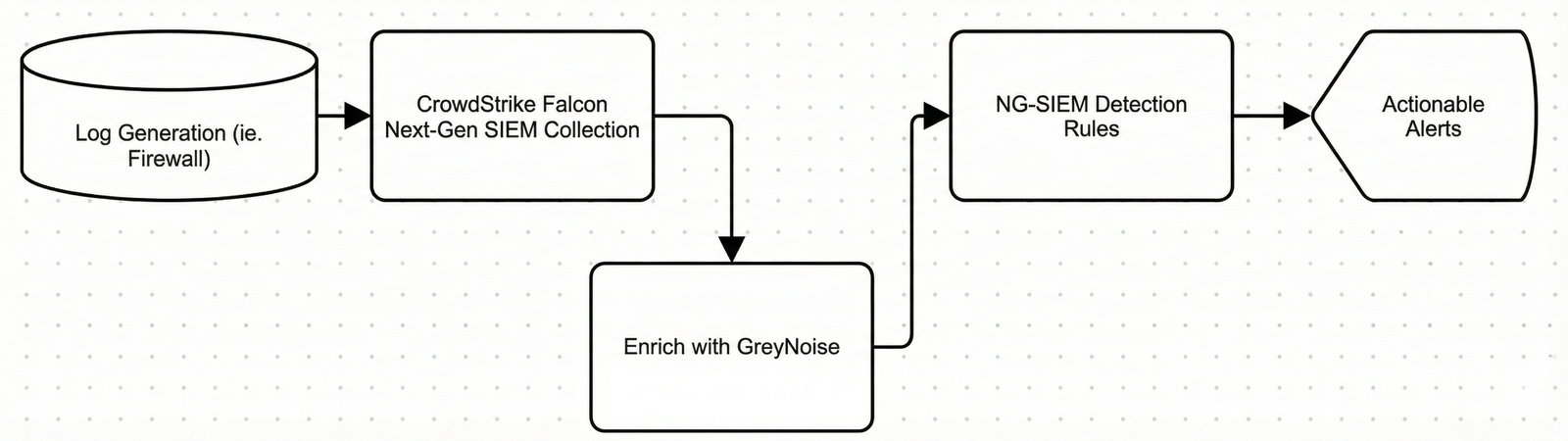
Through this architecture review session with the team, we identified that the first use case could be met by supporting a Lookup File within Falcon Next-Gen-SIEM. Given the nature of our ever-changing data set, we also needed to identify the best way to ensure that this lookup file could be updated systematically at regular intervals to maintain the freshness of the data available for event enrichment.
The second use case was easier. It would require us to define our APIs to create the necessary Falcon Fusion SOAR actions for the workflows; however, it was also beneficial to understand the best practices for implementing these.
GreyNoise Falcon Foundry App Development
The development is where the real fun begins. The CrowdStrike platform allows you to define a new Falcon Foundry app within the Falcon console. This UI-based experience works well for basic actions, such as defining APIs to be used in Falcon Fusion SOAR workflow actions. However, the platform also offers a unique experience that allows you to sync the app code with your local IDE for more advanced configuration and functionality.
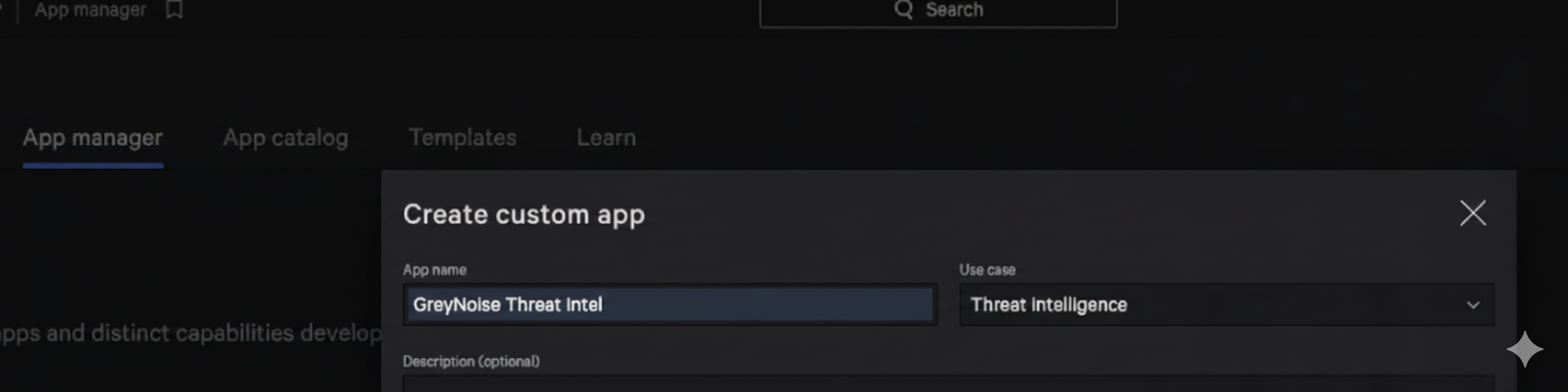
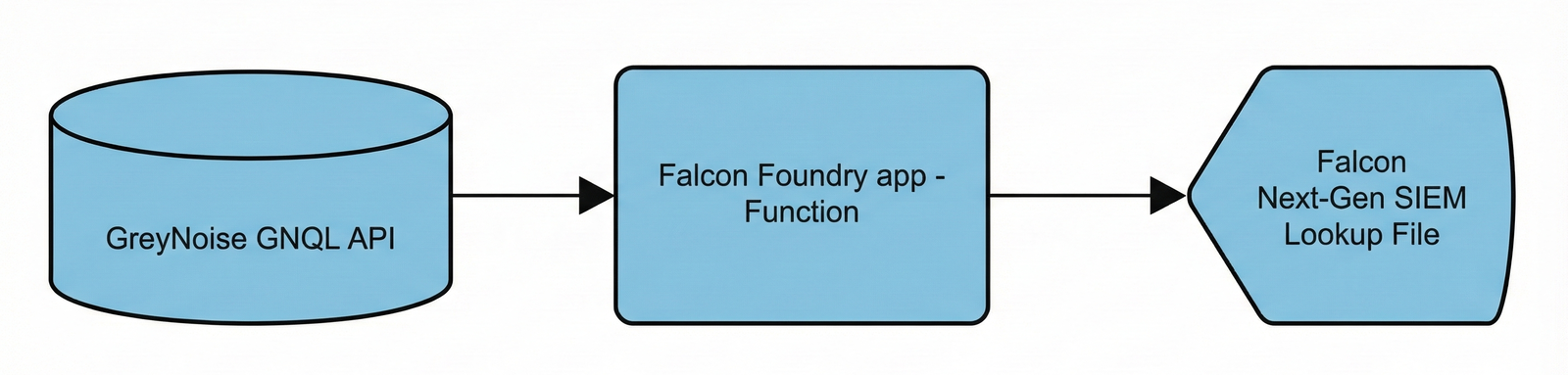
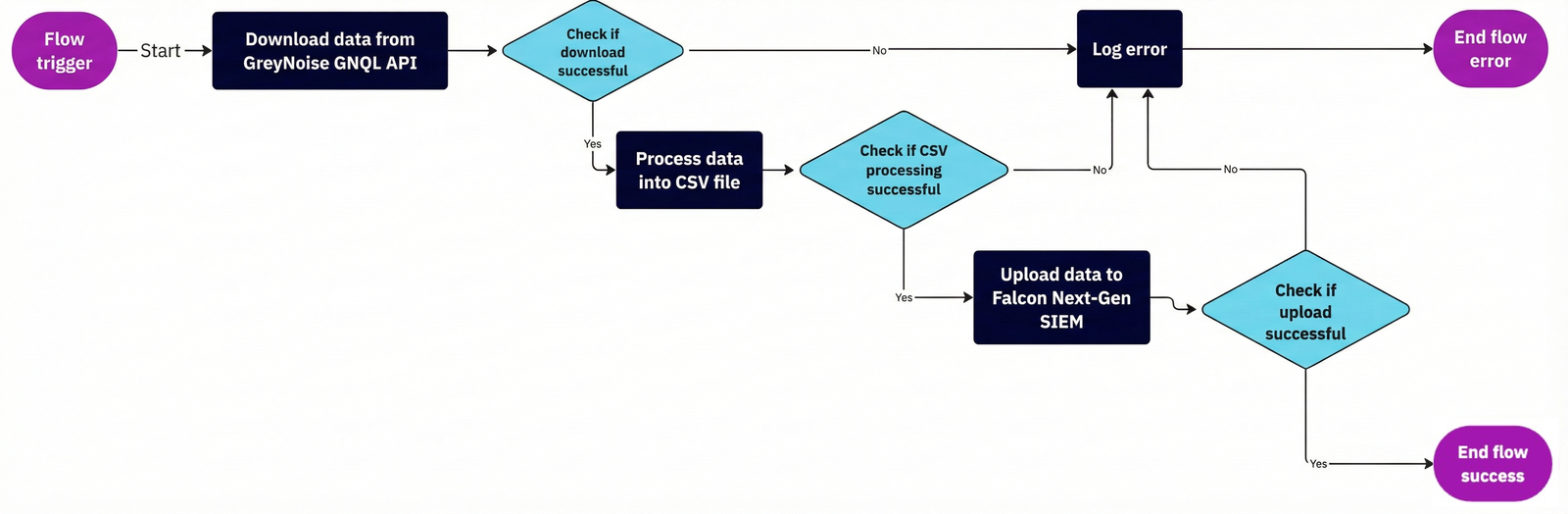
Once we built out the basic app information, it was time to develop what CrowdStrike defines as a function. This function is the core of the integration and took the most work to test and develop thoroughly. In the end, it provides the necessary components to interact directly with the GreyNoise API, download the required indicator information, format the data correctly to be supported as a Falcon Next-Gen SIEM lookup, then finally submit it to Falcon Next-Gen SIEM via the platform Lookup File Upload API.
This represents the basic flow of what we wanted to accomplish:
When we started this process, timing was on our side. The team at Crowdstrike had just released the Threat Intel Import sample app, which provided a good portion of what we needed to create our function successfully. After reviewing the basics of what they had made already, we integrated those concepts into our own function.
Building the Python Function
The function provided in the sample app provides for the basic flow of data transfer, but we still had to implement the ability to process the necessary GreyNoise data first. GreyNoise provides a Python SDK (named FalconPy) as a wrapper around the API, so the first step was to integrate it. Since it was an external Python module, this got defined in the requirements.txt file, and then we were able to import it into the script:
from crowdstrike.foundry.function import APIError, Function, Request, Response
from falconpy import NGSIEM
from greynoise.api import GreyNoise, APIConfig
import pandas as pd
import tempfile
import os
import csv
import gc
from typing import Dict
Function imports
crowdstrike-foundry-function==1.1.3
greynoise==3.0.1
crowdstrike-falconpy
ipaddress==1.0.23
numpy==2.3.5
pandas==2.3.3
Function requirements.txt
The function is accessed by defining a handler that the platform can call, along with all of the appropriate inputs. For this app, a POST request to the path /greynoise-ti-import-bulk was defined.
# Handler greynoise-ti-import-bulk
@func.handler(method="POST", path="/greynoise-ti-import-bulk")
def on_post(request: Request, config: Dict[str, object] | None, logger) -> Response:
    logger.info("Starting NGSIEM CSV import process")
This provided the ability to test the code as we were working on it by running the function in a Docker container using the Foundry CLI.
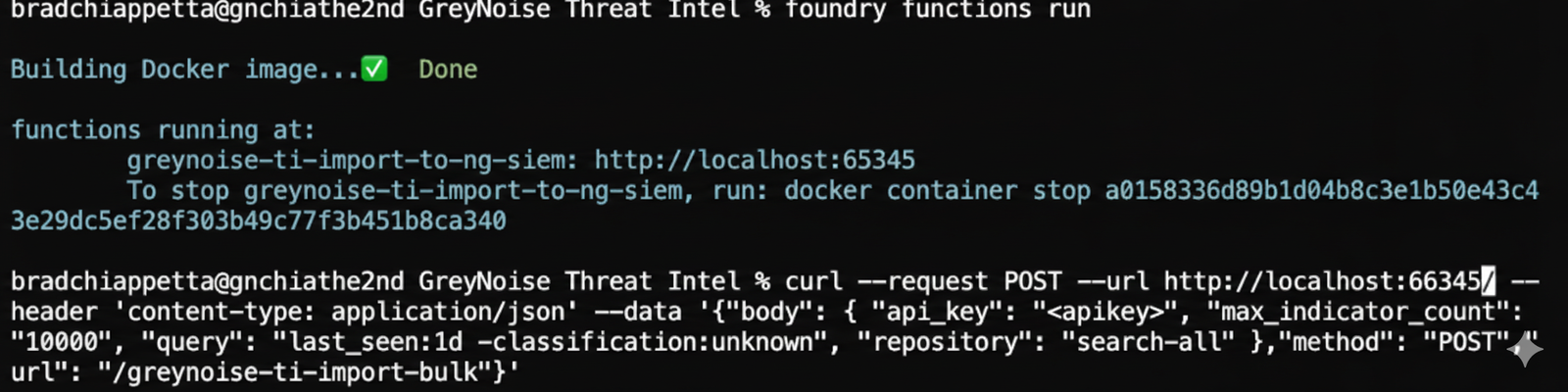
Building the function in Docker to test and executing via curl
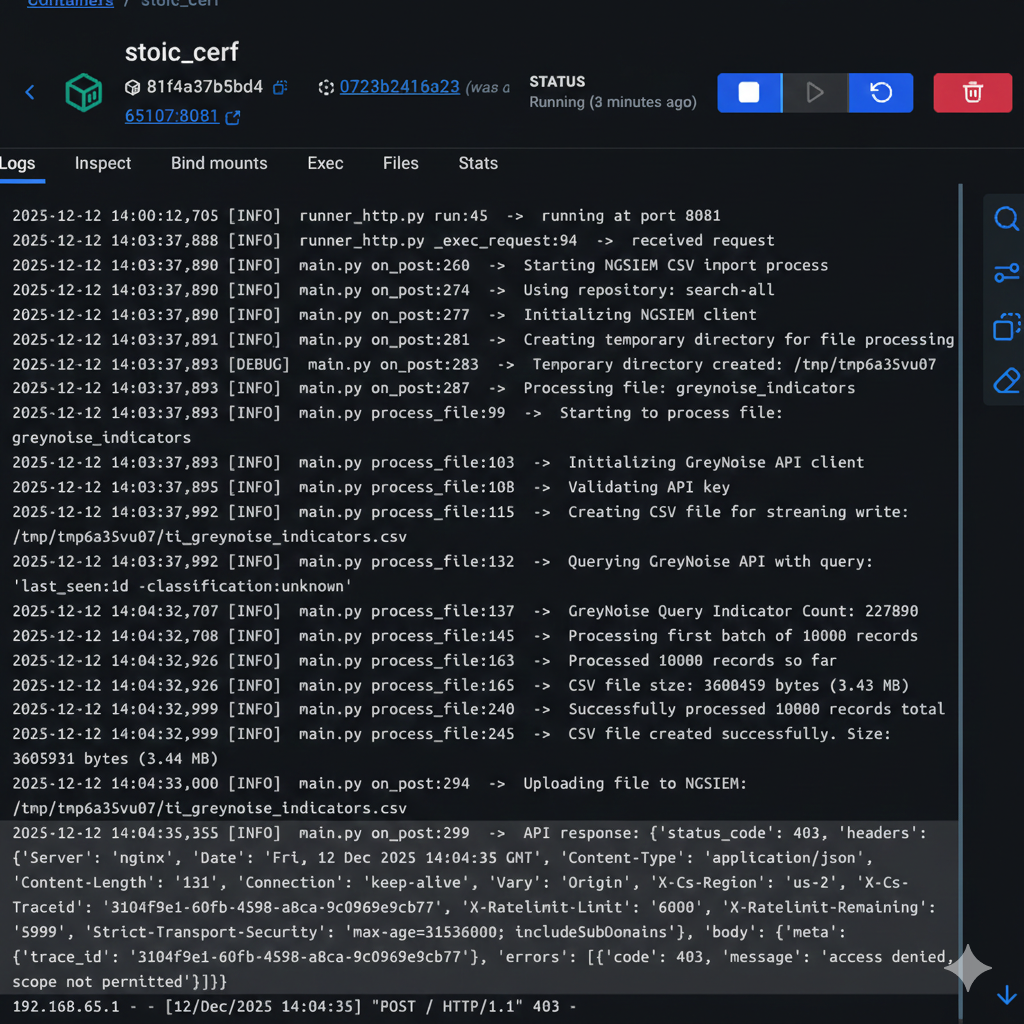
Logs inside the Docker container

Output from the function back to the console
Note: The 403 response is expected here since the Docker container isn’t authorized to upload to the platform.
By sending the following request to the container, the function would run, and we could review the output:
curl --request POST \
  --url https://www.crowdstrike.com:62543/ \
  --header 'content-type: application/json' \
  --data '{
    "body": {
      "api_key": "KEY",
      "max_indicator_count": "1000000",
      "query": "last_seen:1d -classification:unknown",
      "repository": "search-all"
    },
    "method": "POST",
    "url": "/greynoise-ti-import-bulk"
  }'
When figuring out how to gather data from the GreyNoise API and process the data into the needed CSV form, an issue arose with the first implementation, as functions are confined to a limited memory footprint when they run and also have to finish executing in a set time frame. For both of these, some additional parameters were added to the manifest for the function definition:
functions:
    - id: fb66a55435804df9b14e258e5348a24e
      name: greynoise-ti-import-to-ng-siem
      config: null
      description: Import GreyNoise indicators into NGSIEM
      path: functions/greynoise-ti-import-to-ng-siem
      environment_variables: {}
      handlers:
        - name: greynoise-ti-import-bulk
          description: Import GreyNoise indicators into NGSIEM
          method: POST
          api_path: /greynoise-ti-import-bulk
          payload_type: ""
          request_schema: schemas/request_schema.json
          response_schema: schemas/response_schema.json
          workflow_integration:
            id: 7165d716b5c5476d8865ea73cd3b67f8
            disruptive: false
            system_action: false
            tags:
                - fe89fa44c0c8441e8a1d3b60d6063411
                - GreyNoiseThreatIntelligence
                - threat-intel
          permissions: []
      language: python
      max_exec_duration_seconds: 900 ## added to allow longer run time
      max_exec_memory_mb: 1024 ## added to allow additional memory usage
These extended the function’s capabilities to utilize the maximum permitted runtime and also increased the amount of memory the function could consume. While the runtime length solved one issue, the code continued to have problems with memory consumption.
The memory issue was primarily due to the large amount of data being retrieved and stored from the GreyNoise API. When a query is performed, the API returns a sizable amount of data for each indicator. Although the CSV would only save a portion of this data, the API response had to be stored for potentially hundreds of thousands of indicators. The first implementation attempted to store all of the API responses in memory and then process it after retrieval. Still, this method wouldn’t work due to the limited amount of memory allowed.
With a bit of rework, the code was updated to process the data in batches, pulling up to 10,000 indicators per batch from the GreyNoise API and immediately writing only the necessary fields to the CSV for each indicator. Then, a batch deletion and some garbage collection were implemented to help ensure the script could run efficiently.
batch_data = response["data"]
logger.info(f"Processing first batch of {len(batch_data)} records")

# Batch process records for better performance
rows_to_write = []
for i, item in enumerate(batch_data):
    if processed_count >= max_indicator_count:
        break

    row = process_record(item, total_records + i + 1, logger)
    if row is not None:
        rows_to_write.append(row)
        processed_count += 1

# Write all rows at once for better I/O performance
if rows_to_write:
    writer.writerows(rows_to_write)

total_records += len(batch_data)
logger.info(f"Processed {processed_count} records so far")
file_size = os.path.getsize(output_path)
logger.info(f"CSV file size: {file_size} bytes ({file_size / 1024 / 1024:.2f} MB)")

# Clear the batch data to free memory
del batch_data, rows_to_write
The final portion of the function was to push the created CSV file into Falcon Next-Gen SIEM via the lookup file API. The FalconPy SDK helpfully provides a built-in function to perform this action, so this step should have been pretty straightforward.
logger.info(f"Uploading file to NGSIEM: {output_path}")
response = ngsiem.upload_file(lookup_file=output_path, repository=repository)

# Log the raw response for troubleshooting
logger.info(f"API response: {response}")
Unfortunately, during the initial testing, while it was observed that the CSV was successfully created and stored in the temporary directory, the file was never made into Falcon Next-Gen SIEM. Again, with some guidance from the CrowdStrike team, some additional logging was built in, which could actually be consumed and viewed within Falcon Next-Gen SIEM.
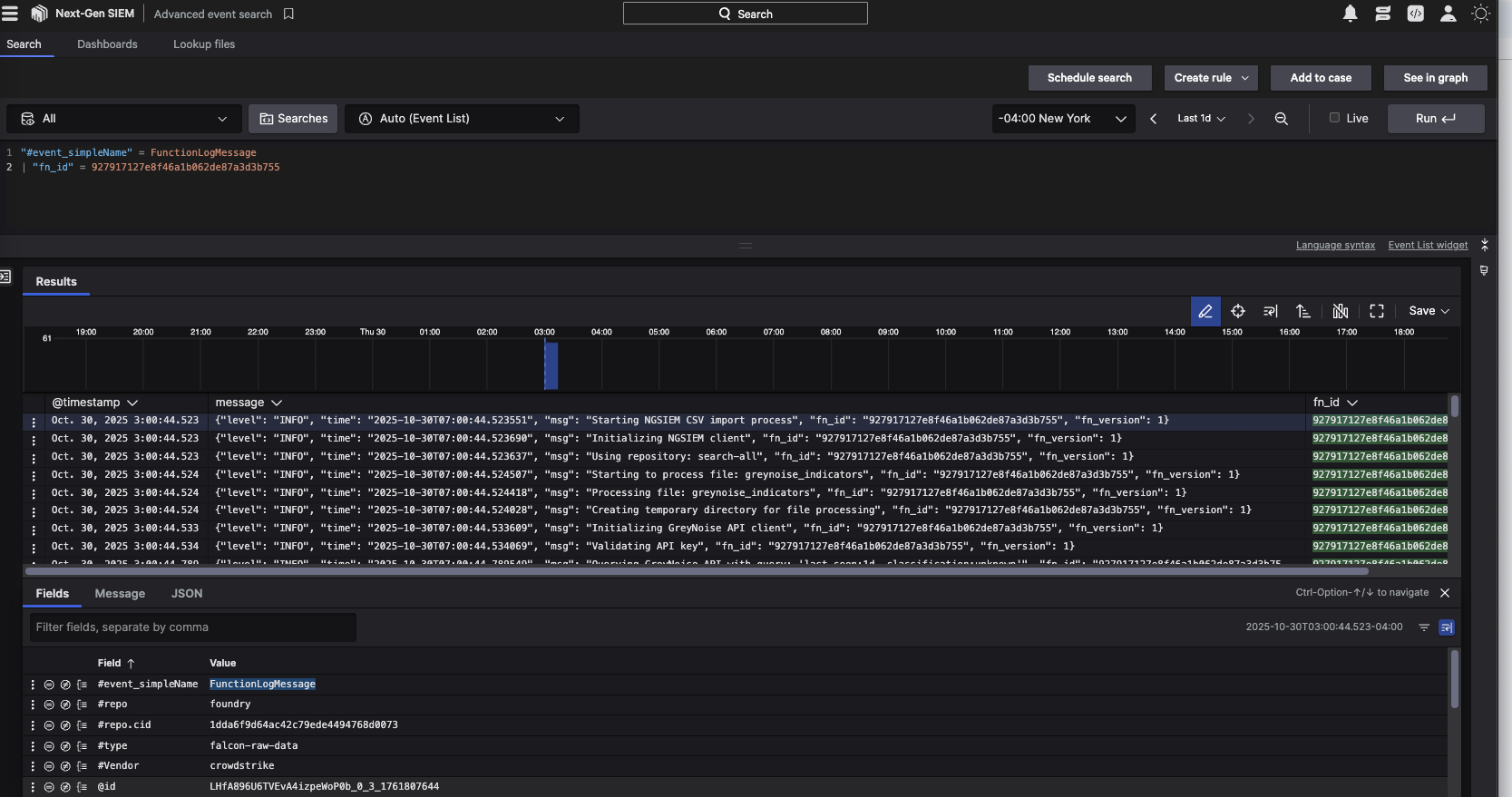
With these detailed logs, it was identified that when creating the App manifest, one of the required scopes for this function to upload the file was missing. Once this was added, the test files were successfully imported into Falcon Next-Gen SIEM.
auth:
    scopes:
        - humio-auth-proxy:write
    permissions: {}
    roles: []
Building the Workflow
Next, we implemented a simple workflow that would execute the function on a schedule. This part was easier to accomplish in the Falcon console, so we synced our changes back to the cloud and built out the workflow to accept the necessary inputs and run the workflow according to the defined schedule.
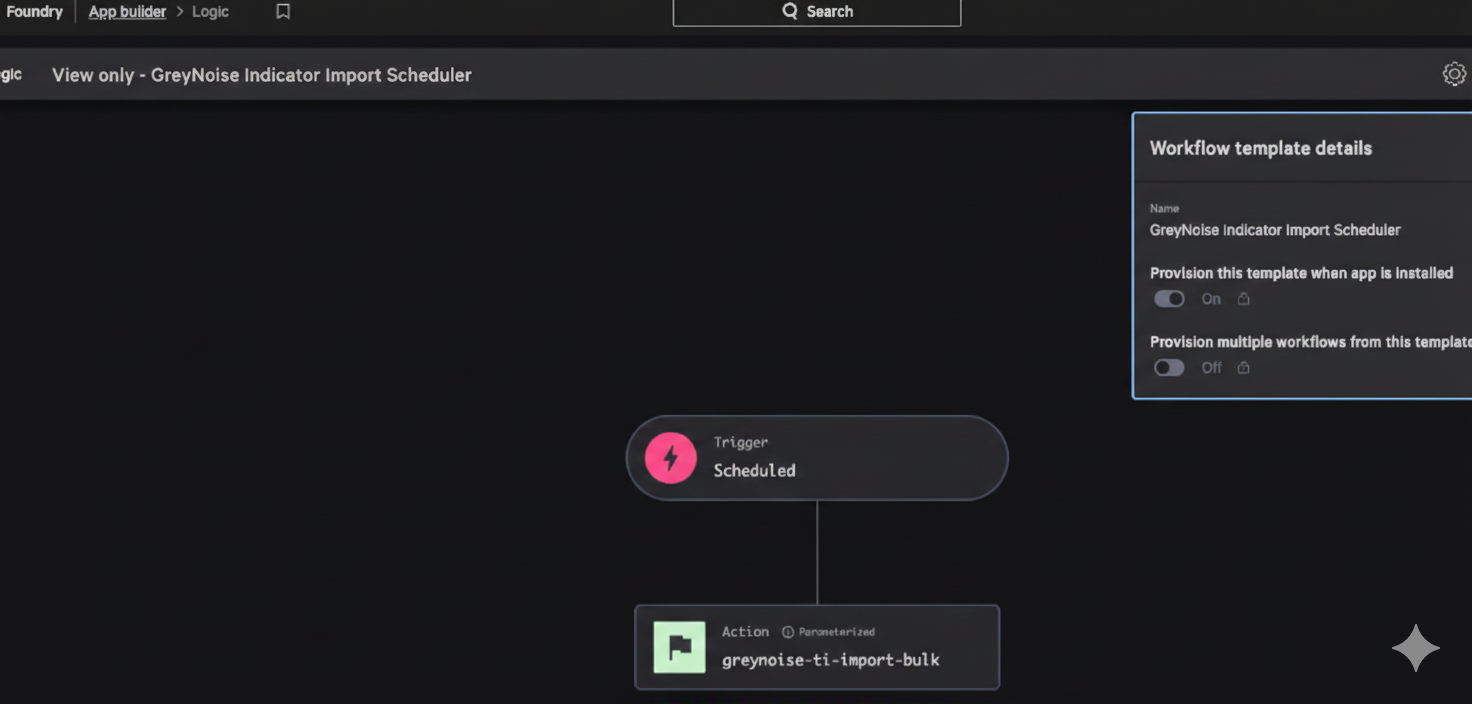
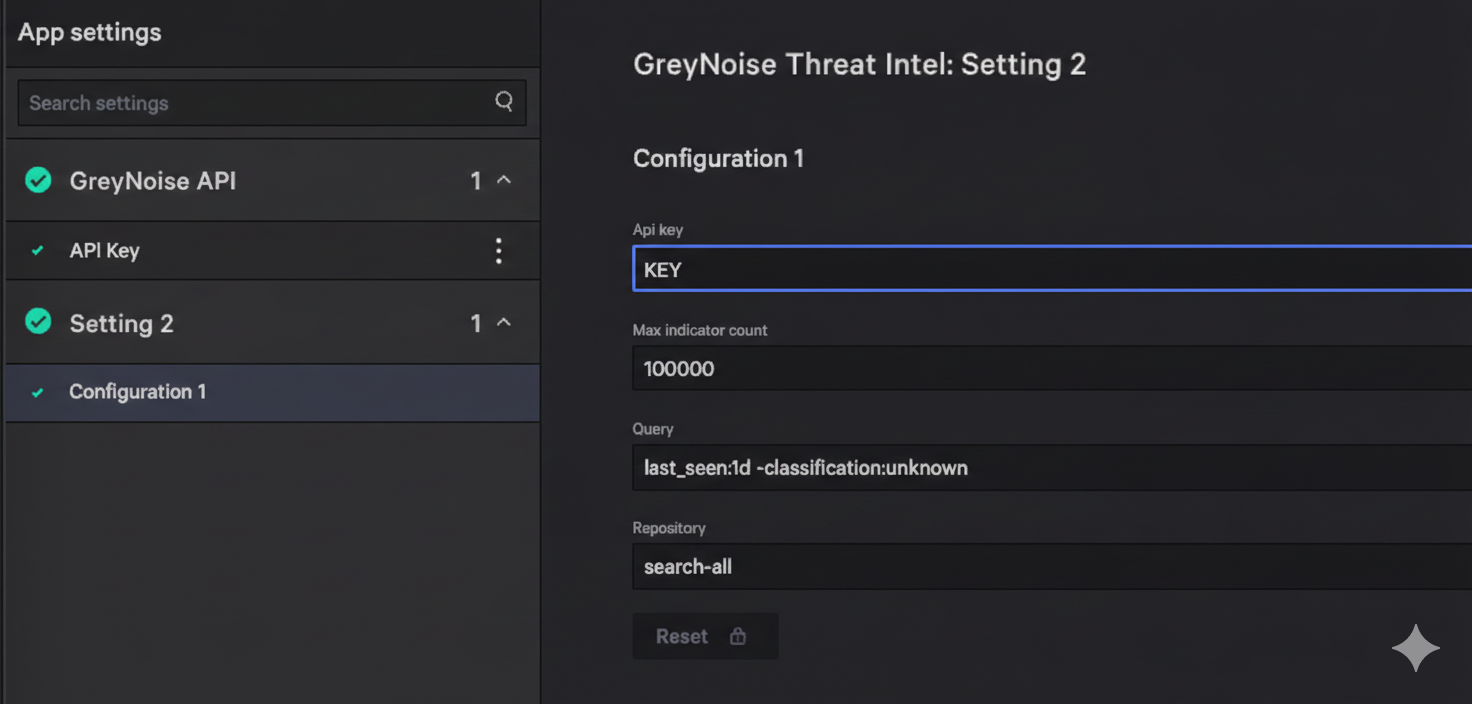
The workflow is set up during the configuration of the Falcon Foundry app and is based on the inputs defined for the function within the manifest. These also match the ones used when testing in the Docker container:
Testing and Troubleshooting the GreyNoise Falcon Foundry App
At this point, we had implemented all the functionality we wanted in our 1.0 version, so the final step was to test it thoroughly. The API Integration was straightforward, and we were able to add the actions into workflows and confirm that the inputs and outputs for each one worked as desired. However, the pre-built workflow to generate the lookup file caused us some trouble during the initial implementation.
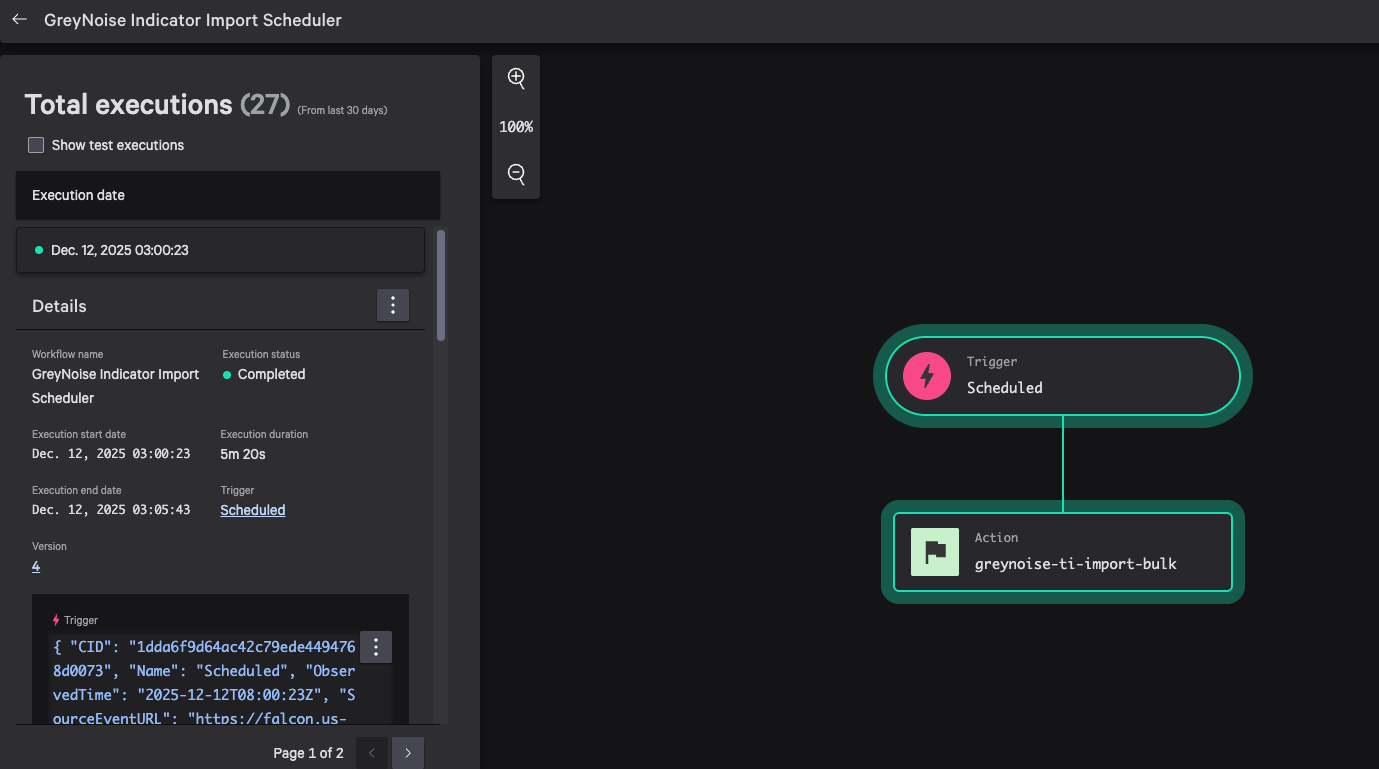
If you recall, while developing the function, there was success in uploading and creating some small test lookup files. However, during the final testing, we attempted to build the full lookup file, but the process kept failing.
Unfortunately, the logs weren’t providing much information, and in some cases, actually logged a successful process completion, but with no lookup file created. At this point, we had done what we could, but were unable to identify the final issue. Once again, we engaged with the team at CrowdStrike to figure out what we had missed in our buildout.
With some back and forth over email, sharing our code and errors, then a few Zoom sessions to review things in real-time, we finally figured out that smaller files were successful, but the full file never made it into the system. With this discovery, things got escalated over to the engineering team at CrowdStrike, where it got relayed back to us that the current upload API we needed to use to push the lookup file into Falcon Next-Gen SIEM had a max file size of 50MB, even though the console provided a different, higher value.
Back in the code, some additional logging was added to help track the file sizes, and then a limit (slightly under the max to leave a buffer) was imposed in the code to stop the file from ever growing too large:
total_records += len(batch_data)
logger.info(f"Processed {processed_count} records so far")
file_size = os.path.getsize(output_path)
logger.info(f"CSV file size: {file_size} bytes ({file_size / 1024 / 1024:.2f} MB)")

# Clear batch data to free memory
del batch_data

    if file_size > 47000000:
        logger.warning("File size is greater than 47MB, stopping processing")
        break
Once updated and pushed back to the system, the process would work successfully each time. We left the matter with the CrowdStrike team to increase the upload limit, allowing us to push large files in a future update. This limit will eventually be removed (or at least increased).
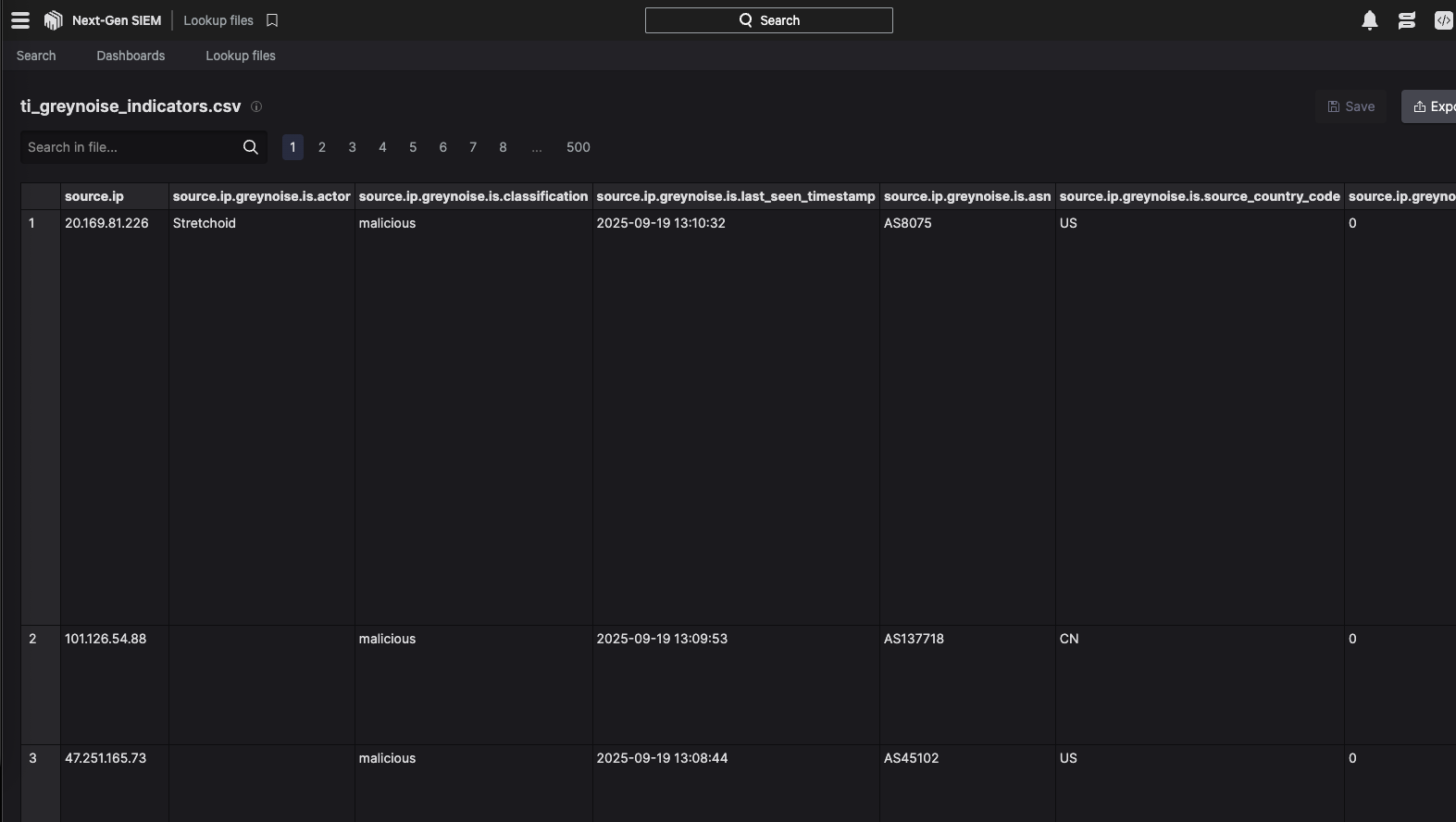
At this point, the development process had been completed, and we were able to test all of the functionality end-to-end.
Final Validation of the GreyNoise Falcon Foundry App
To sign off on the final build, we had to export the app and send it to the CrowdStrike team. In addition to reviewing the app from end to end, we also spent time demonstrating the functionality and what had been built out. The team seemed satisfied with what we were able to show during the review session, which went smoothly due to the great partnership and support we received from the team throughout the development process. Once they were able to finish the validation process, the app got uploaded, making the GreyNoise Threat Intel Falcon Foundry App a reality.
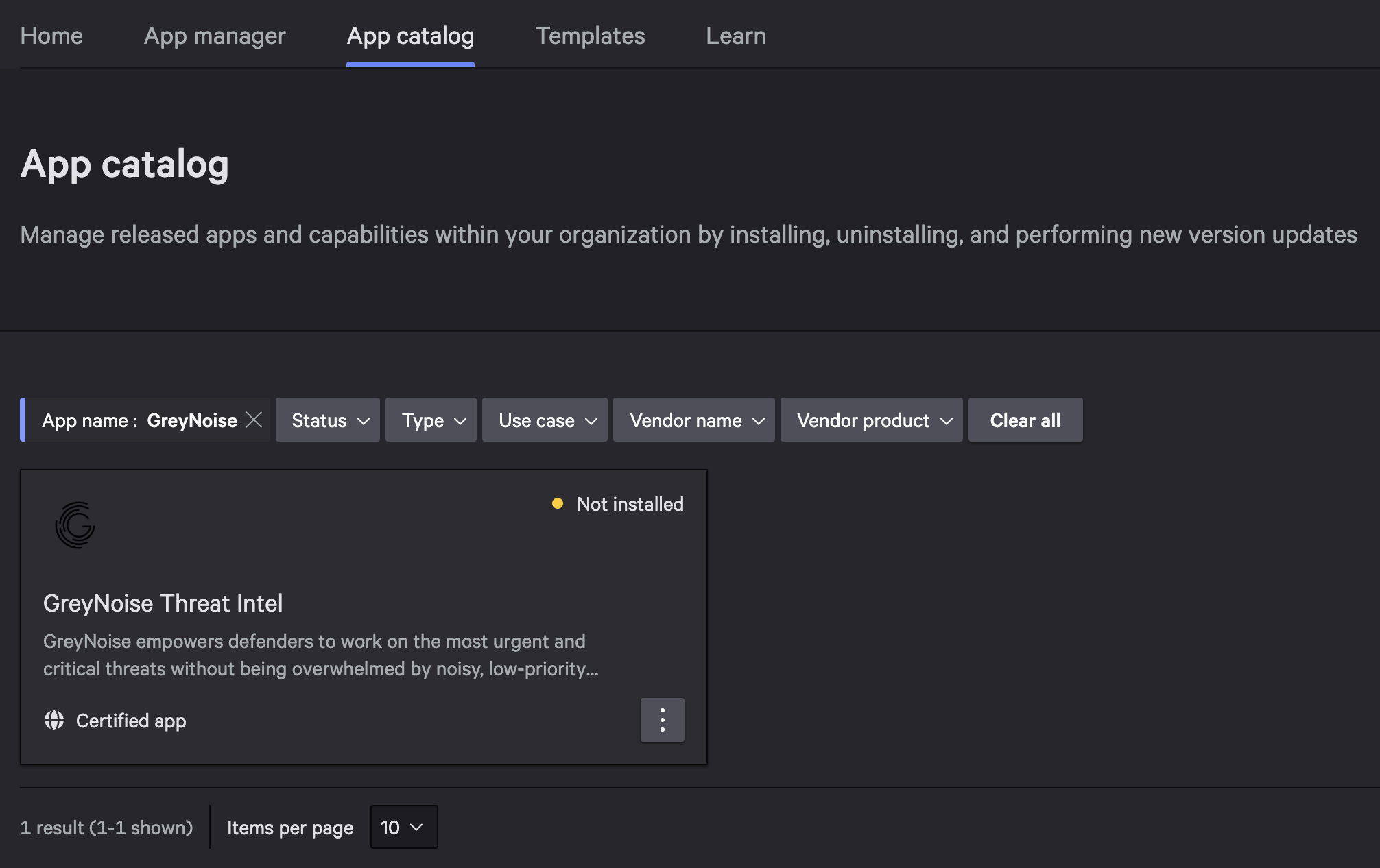
You can find it in the Falcon console at Foundry > App catalog and searching for “GreyNoise”.
Development Process Thoughts
Overall, the process to build out the GreyNoise Threat Intel Falcon Foundry App wasn’t too bumpy (we have experienced others that were substantially more painful). The CrowdStrike team was able to provide some solid information before we started the process and was willing to work with us when we hit some challenges, but from end to end, we were able to identify what it was we wanted to implement and get it built with the resources on hand. Are there places the process could be improved? Of course, no process is perfect from end to end, but the important thing is that we achieved our goals in roughly the timeframe we wanted to, which is a solid win on both sides.
Next Steps for the GreyNoise Falcon Foundry App
As noted earlier, this was the first iteration of the app, and we intend to continue to iterate on it to add more functionality and improvements as we gather user feedback and requirements. We are working to identify out-of-the-box workflows that support Threat Hunting and Incident Triage, as well as some Vulnerability Management use cases. We’re also looking forward to seeing what sort of useful dashboards could be included as part of the app. We expect to push some updates before the end of the year and will gain a complete understanding of the update process for submitting our changes to the CrowdStrike team.
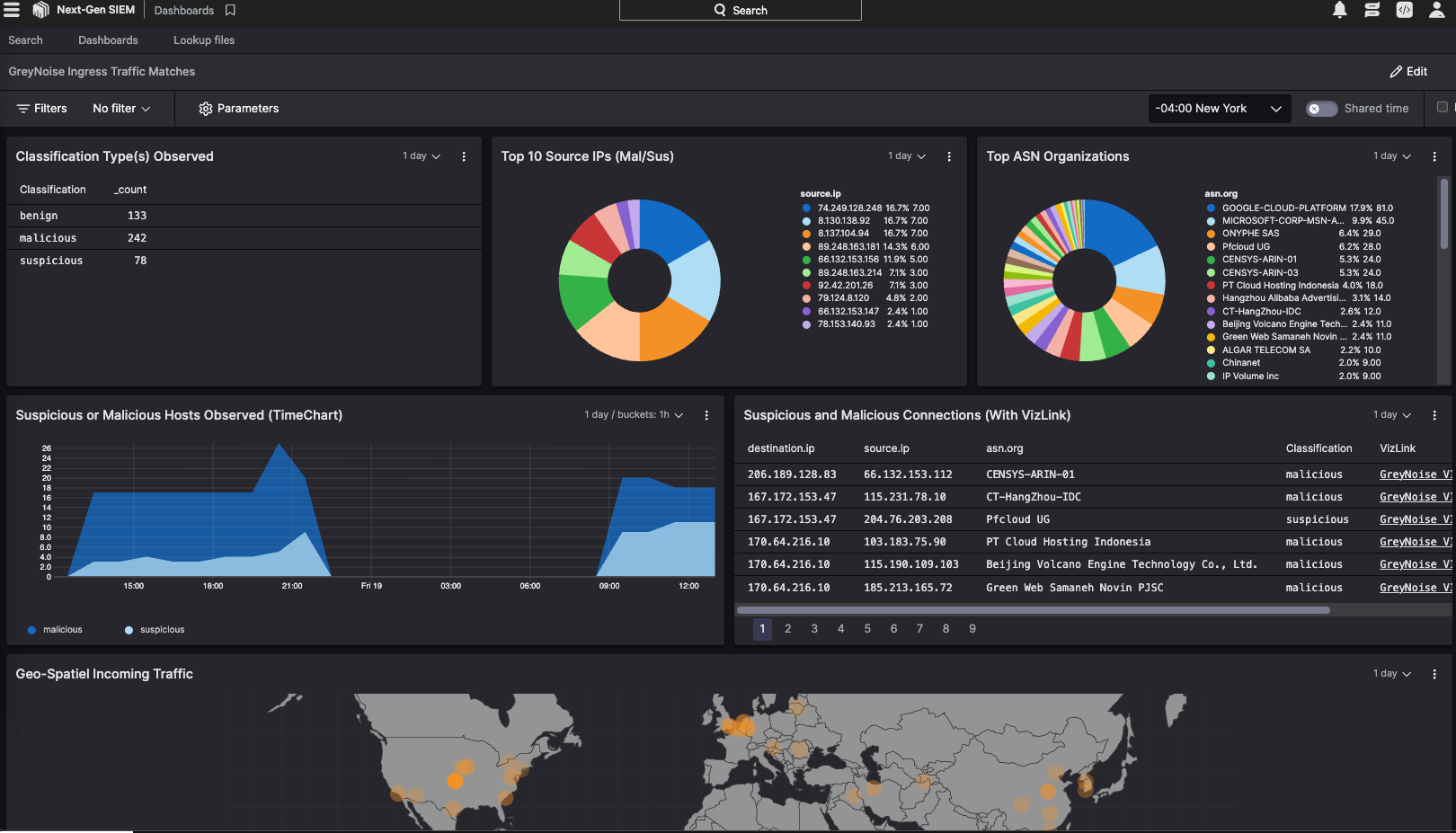
A sample dashboard based on GreyNoise Intel enrichment used to match with ingress traffic