API Pagination Strategies for Falcon Foundry: Functions and Workflows

Pagination strategies that work for thousands of records often fail catastrophically at scale. A function that successfully processes 65,000 records in 10 minutes may hit the 15-minute timeout limit when pointed at datasets with 400 million records, processing less than 1% of the data before timing out.
This guide covers pagination implementation strategies for CrowdStrike’s Falcon Foundry platform, focusing on the critical decision between function-based and workflow-based approaches. Understanding your data volume upfront isn’t just about optimization. It fundamentally changes how you should architect your solution.
This article demonstrates:
- When to use functions versus workflows for pagination
- Implementation patterns for six common API pagination types
- Production-ready error handling with exponential backoff and rate limiting
- Real-world examples from threat intelligence integrations processing millions of IOCs
- Testing strategies to validate pagination logic before deployment
Whether you’re integrating with threat intelligence feeds, processing security events, or pulling data from any paginated API, these patterns will help you build scalable solutions that handle both small test datasets and production-scale data volumes.
Table of Contents:
- Understanding Pagination Limits in Falcon Foundry
- Identifying Common Pagination Patterns
- Function-Based Pagination for Small Datasets
- Workflow-Based Pagination: The Production Solution
- Handling Rate Limits and Errors
- Testing Your Pagination Logic
- Key Takeaways and Decision Guide
- Next Steps
Understanding Pagination Limits in Falcon Foundry
Before diving into implementation details, you need to understand the constraints that will shape your pagination strategy in Falcon Foundry.
Function Constraints
Falcon Foundry functions have hard limits that you can’t work around:
- 15-minute execution timeout: Your function must complete all work within 15 minutes
- Memory limits: 256 MB by default, configurable up to 1 GB maximum
- Synchronous execution: Functions run to completion in a single execution
For small to medium datasets (think thousands of records, not millions), function-based pagination works great. You can write straightforward Python code, manage state with collections, and process everything in a single execution.
Workflow Advantages
When you need to process larger datasets or can’t predict the data size upfront, Falcon Fusion SOAR workflows give you dramatically different capabilities:
- 100,000 iteration limit: Workflows can loop up to 100,000 times
- 7-day execution window: Workflows can run for up to 7 days
- Built-in pagination support: Workflows have native constructs for iterative processing
- Better error recovery: Failures don’t require starting from scratch
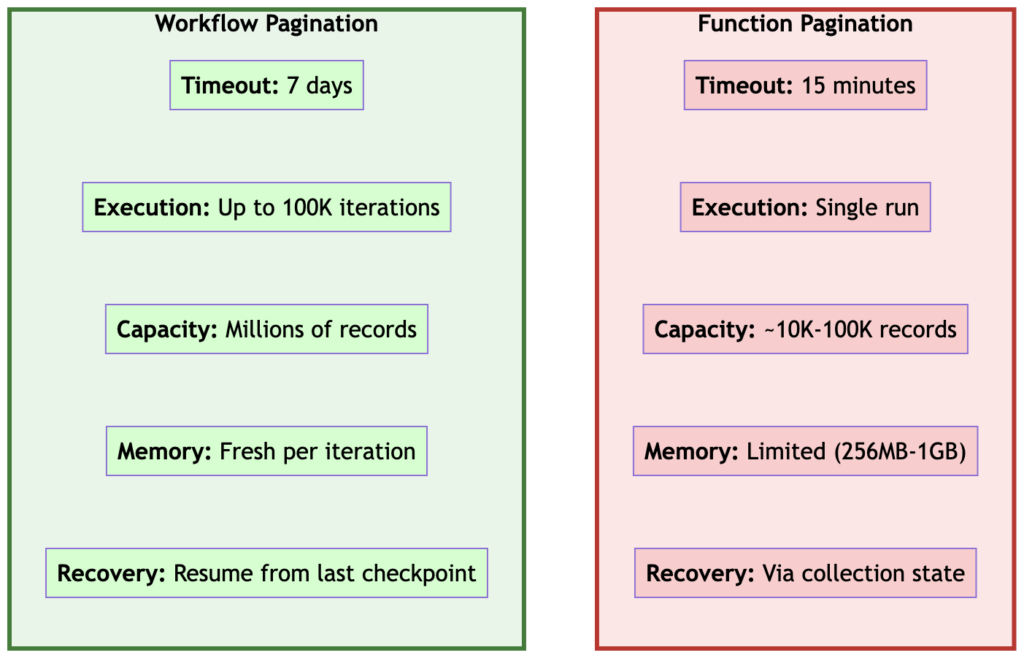
Figure 1: Functions work great for small, predictable datasets. Workflows scale to massive datasets with built-in resilience.
The Decision Point
A practical rule of thumb for this decision:
Use functions when:
- You know the dataset is small (under 10,000 records)
- All paginated API calls combined will complete in under 10 minutes
- You want simpler code and testing
Use workflows when:
- Dataset size is unknown or potentially large
- You’re processing more than 10,000 records
- You need resilience for long-running processes
- The API you’re calling is slow or rate-limited
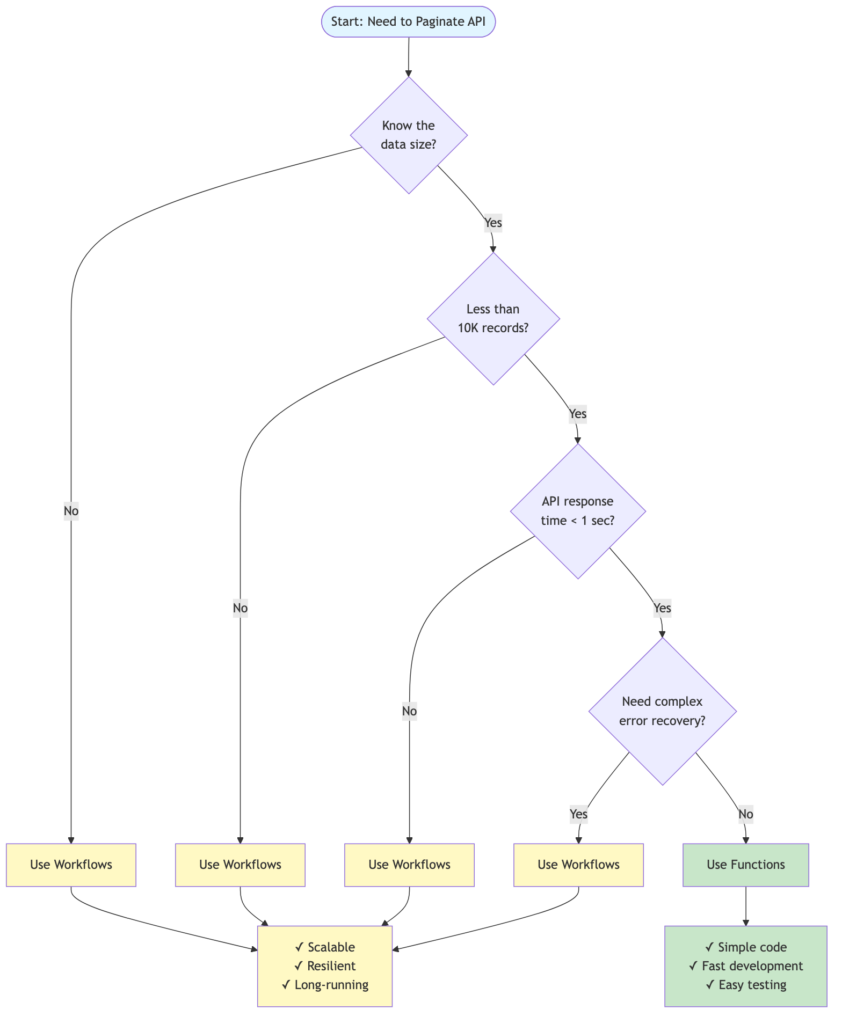
Figure 2: Decision tree for choosing between function-based and workflow-based pagination
Recommended Development Approach
The most effective development workflow: Develop your pagination logic in a function first, test it locally, then add the workflow orchestration once the function logic is solid.
Why? The deploy/release/install cycle for workflows during development is much slower than with functions. With functions, you can:
- Test everything locally: Run your function on
localhost:8081, simulate workflow calls with curl/HTTPie - Iterate quickly: Make a change, restart the function, test immediately
- Debug easily: Use logging statements, breakpoints, whatever you need
- Create the workflow separately: Build the workflow outside your app initially to iterate faster
Once your function handles pagination correctly (start token, fetch page, return next token), adding the workflow orchestration is straightforward. You’re just calling a working function repeatedly instead of debugging both the function logic and workflow mechanics simultaneously.
Pro tip: Write test scripts that simulate how the workflow will call your function (see the comprehensive-testing branch in the Anomali sample for examples). This branch demonstrates advanced testing patterns that you can adapt for your own implementations. This lets you validate the complete pagination flow before deploying a single workflow.
Now that you understand when to use functions versus workflows, the following sections examine six common pagination patterns encountered in production APIs.
Identifying Common Pagination Patterns
Every API has its own way of handling pagination, and recognizing the pattern upfront will save you hours of debugging. Most APIs use one of these six common patterns:
1. Offset and Limit (Page-Based)
The most common pattern. You specify how many records to skip and how many to return.
Example Request:
GET /api/data?offset=0&limit=100
Response:
{
  "results": [...],
  "offset": 0,
  "limit": 100,
  "total": 5000
}
Next Request:
GET /api/data?offset=100&limit=100
When to stop: When offset + limit >= total or when you get an empty results array.
2. Cursor-Based Pagination
The API returns a cursor (token) that points to the next page. More efficient than offset-based for large datasets.
Example Response:
{
  "data": [...],
  "cursor": {
    "next": "eyJpZCI6MTAwfQ=="
  }
}
Next Request:
GET /api/data?cursor=eyJpZCI6MTAwfQ==
When to stop: When cursor.next is null or missing.
3. Page Number Pagination
Similar to offset/limit but uses page numbers instead.
Example Request:
GET /api/data?page=1&per_page=100
Response:
{
  "data": [...],
  "page": 1,
  "per_page": 100,
  "total_pages": 50
}
When to stop: When page >= total_pages.
4. Link Header Pagination (RFC 5988)
The API provides pagination links in HTTP headers.
Example Headers:
Link: <https://api.example.com/data?page=2>; rel="next",
      <https://api.example.com/data?page=50>; rel="last"
When to stop: When there’s no rel="next" link.
5. Search After (Elasticsearch-style)
Uses a sort value from the last result as the starting point for the next page.
Example Response:
{
  "hits": [...],
  "search_after": [1234567890, "doc_id_123"]
}
Next Request:
{
  "search_after": [1234567890, "doc_id_123"],
  "size": 100
}
When to stop: When the results array is empty.
6. Timestamp-Based Pagination
Uses timestamps to fetch data incrementally, common in streaming APIs.
Example Request:
GET /api/events?since=2025-10-20T10:00:00Z
Response:
{
  "events": [...],
  "next_timestamp": "2025-10-20T10:30:00Z"
}
When to stop: When you reach the current timestamp or get no results.
Important: Pay close attention to timezone handling with timestamp-based pagination. Always use UTC timestamps consistently across your function and the API to avoid missing data. If the API uses a different timezone, convert your system time to match the API’s expected timezone before making requests. Timezone mismatches can cause you to miss recent data or request data that doesn’t exist yet.
# Convert to UTC before API calls
from datetime import datetime, timezone
timestamp = datetime.now(timezone.utc).isoformat()

Figure 3: Examples of different pagination response formats you’ll encounter in real APIs
How to Identify an API’s Pattern
Look at the API documentation or make a test call and examine:
- Query parameters: What pagination parameters does the API accept?
- Response structure: Does it include
next,cursor,total, oroffsetfields? - Response headers: Check for
Linkheaders - URL patterns: Does the
nextURL include tokens, offsets, or page numbers?
Most modern APIs document their pagination approach, but when in doubt, make a test call and look at what comes back. The structure of the response will tell you everything you need to know.
With these pagination patterns in mind, let’s build a working example using the simplest approach: function-based pagination for small datasets.
Function-Based Pagination for Small Datasets
The following example uses the Pokémon API. This approach works great when you’re confident the dataset is manageable (under 10,000 records) and the processing completes quickly.
I chose the Pokémon API for this demo because it doesn’t require authentication, making it easy to follow along. But the patterns I’ll show you apply to any paginated API.
The Core Pattern
The basic flow for function-based pagination:
- Check if you have saved pagination state
- Fetch a page of data using the saved state (or start from the beginning)
- Process the data
- Save the new pagination state
- If there’s more data, repeat
State Management with Collections
While a function executes only once per invocation, you need persistent state in scenarios where:
- The function might timeout before processing all pages (15-minute limit)
- You schedule the function to run multiple times to resume where it left off
- You want graceful recovery from failures without reprocessing data
For small datasets that complete in one execution, you could use local variables and a simple while loop. But for larger datasets that might take multiple invocations, Falcon Foundry collections provide the perfect place to store your pagination state between function calls:
from falconpy import APIHarnessV2
import json

def get_pagination_state(collection_key: str):
    """Retrieve the last pagination state from collections."""
    collection_client = APIHarnessV2()

    try:
        response = collection_client.command("GetObject",
                                             collection_name="pagination_tracker",
                                             object_key=collection_key
                                             )
        if isinstance(response, bytes):
            json_data = json.loads(response.decode("utf-8"))
            return json_data.get("limit", -1), json_data.get("offset", -1)
    except Exception:
        # Catches failures from the GetObject API call (e.g., collection doesn't exist yet)
        # or JSON parsing errors. The .get() defaults handle missing keys within valid JSON.
        return -1, -1

def save_pagination_state(collection_key: str, limit: int, offset: int):
    """Save pagination state to collections for next execution."""
    collection_client = APIHarnessV2()

    state_data = {
        "limit": limit,
        "offset": offset
    }

    response = collection_client.command("PutObject",
                                         collection_name="pagination_tracker",
                                         object_key=collection_key,
                                         body=state_data
                                         )

    # Check if the save was successful
    if response["status_code"] != 200:
        errors = response["body"].get("errors", [])
        error_msg = errors[0]["message"] if errors else "Unknown error"
        raise Exception(f"Failed to save pagination state: {error_msg}")
The collection schema defines the pagination state structure as:
{
  "$schema": "https://json-schema.org/draft-07/schema",
  "type": "object",
  "properties": {
    "limit": {
      "type": "integer",
      "description": "Number of records per page"
    },
    "offset": {
      "type": "integer",
      "description": "Current offset position in the dataset"
    }
  },
  "required": ["limit", "offset"]
}
Complete Function Example
The following function demonstrates pagination with the Pokemon API.
"""Main module for Pokémon API pagination function handler."""

from crowdstrike.foundry.function import Function, Request, Response, APIError
from falconpy import APIIntegrations, APIHarnessV2
from urllib.parse import urlparse, parse_qs
import json

FUNC = Function.instance()


def get_pagination_state(collection_key: str):
    """
    Retrieve the last pagination state from collections.

    Args:
        collection_key: The key to identify this pagination state

    Returns:
        tuple: (limit, offset) from saved state, or (-1, -1) if no state exists
    """
    collection_client = APIHarnessV2()

    try:
        response = collection_client.command("GetObject",
                                             collection_name="pagination_tracker",
                                             object_key=collection_key
                                             )
        if isinstance(response, bytes):
            json_data = json.loads(response.decode("utf-8"))
            return json_data.get("limit", -1), json_data.get("offset", -1)
    except Exception:
        # No previous state found, start from beginning
        return -1, -1


def save_pagination_state(collection_key: str, limit: int, offset: int):
    """
    Save pagination state to collections for next execution.

    Args:
        collection_key: The key to identify this pagination state
        limit: Number of records per page
        offset: Current offset position in the dataset
    """
    collection_client = APIHarnessV2()

    state_data = {
        "limit": limit,
        "offset": offset
    }

    response = collection_client.command("PutObject",
                                         collection_name="pagination_tracker",
                                         object_key=collection_key,
                                         body=state_data
                                         )

    # Check if the save was successful
    if response["status_code"] != 200:
        errors = response["body"].get("errors", [])
        error_msg = errors[0]["message"] if errors else "Unknown error"
        raise Exception(f"Failed to save pagination state: {error_msg}")


def delete_pagination_state(collection_key: str):
    """
    Delete pagination state from collections.

    Args:
        collection_key: The key to identify this pagination state
    """
    collection_client = APIHarnessV2()

    response = collection_client.command("DeleteObject",
                                         collection_name="pagination_tracker",
                                         object_key=collection_key
                                         )

    if response["status_code"] != 200:
        errors = response["body"].get("errors", [])
        error_msg = errors[0]["message"] if errors else "Unknown error"
        raise Exception(f"Failed to delete pagination state: {error_msg}")


@FUNC.handler(method="POST", path="/pagination-example")
def on_post(request: Request) -> Response:
    """
    Handle POST requests to fetch paginated Pokémon data.

    Args:
        request: The incoming request object containing the request body

    Returns:
        Response: JSON response with Pokémon results and pagination state
    """
    results = []

    while True:
        # Get saved pagination state
        limit, offset = get_pagination_state("pokemon")

        # Use request parameters if provided, otherwise use saved state
        if request.body.get("limit", 0) > 0:
            limit = request.body.get("limit")
        elif limit == -1:
            limit = request.body.get("limit", 10)

        if request.body.get("offset", 0) > 0:
            offset = request.body.get("offset")
        elif offset == -1:
            offset = request.body.get("offset", 0)

        # Fetch data from API integration
        api_integration_client = APIIntegrations()
        response = api_integration_client.execute_command(
            definition_id="pokemon-api",
            operation_id="pokemon_list",
            query={
                "limit": int(limit),
                "offset": int(offset),
            }
        )

        if response["status_code"] == 200:
            resp_body = response["body"]["resources"][0]["response_body"]
            results.extend(resp_body.get("results", []))

            # Check for next page
            next_url = resp_body.get("next")
            if next_url:
                # Parse next URL to get pagination params
                parsed_url = urlparse(next_url)
                query_params = parse_qs(parsed_url.query)
                query_params = {k: v[0] for k, v in query_params.items()}

                # Save state for next execution
                save_pagination_state(
                    "pokemon",
                    int(query_params.get("limit")),
                    int(query_params.get("offset"))
                )
            else:
                # No more pages
                break
        else:
            break

    return Response(code=200, body={"results": results})

# Pro tip: Always include a reset endpoint like this in your function.
# It's invaluable for testing and recovery when things go wrong.
@FUNC.handler(method="POST", path="/pagination-reset")
def on_reset(request: Request) -> Response:
    """
    Handle POST requests to reset pagination state.

    Args:
        request: The incoming request object

    Returns:
        Response: JSON response confirming reset
    """
    delete_pagination_state("pokemon")
    return Response(code=200, body={"message": "Pagination state reset"})


if __name__ == "__main__":
    FUNC.run()
This function demonstrates the complete pagination flow. The on_post() handler loops through pages, saving state after each one. If the function needs to be called multiple times (due to timeouts or scheduled execution), it picks up where it left off using the saved state. The on_reset() handler provides a way to start over from the beginning when needed.
Request and Response Schemas
Foundry functions require JSON schemas to define their input and output formats. The request_schema.json for the pagination endpoint looks as follows:
{
  "$schema": "http://json-schema.org/draft-07/schema#",
  "type": "object",
  "properties": {
    "limit": {
      "type": "integer",
      "description": "Number of records per page",
      "default": 10
    },
    "offset": {
      "type": "integer",
      "description": "Starting offset for pagination",
      "default": 0
    }
  }
}
And the response_schema.json:
{
  "$schema": "http://json-schema.org/draft-07/schema#",
  "type": "object",
  "properties": {
    "results": {
      "type": "array",
      "description": "Array of Pokemon results",
      "items": {
        "type": "object"
      }
    }
  }
}
These schemas provide validation and documentation for your function’s API contract. When you deploy your function, Falcon Foundry uses these schemas to validate incoming requests and document the expected response format.
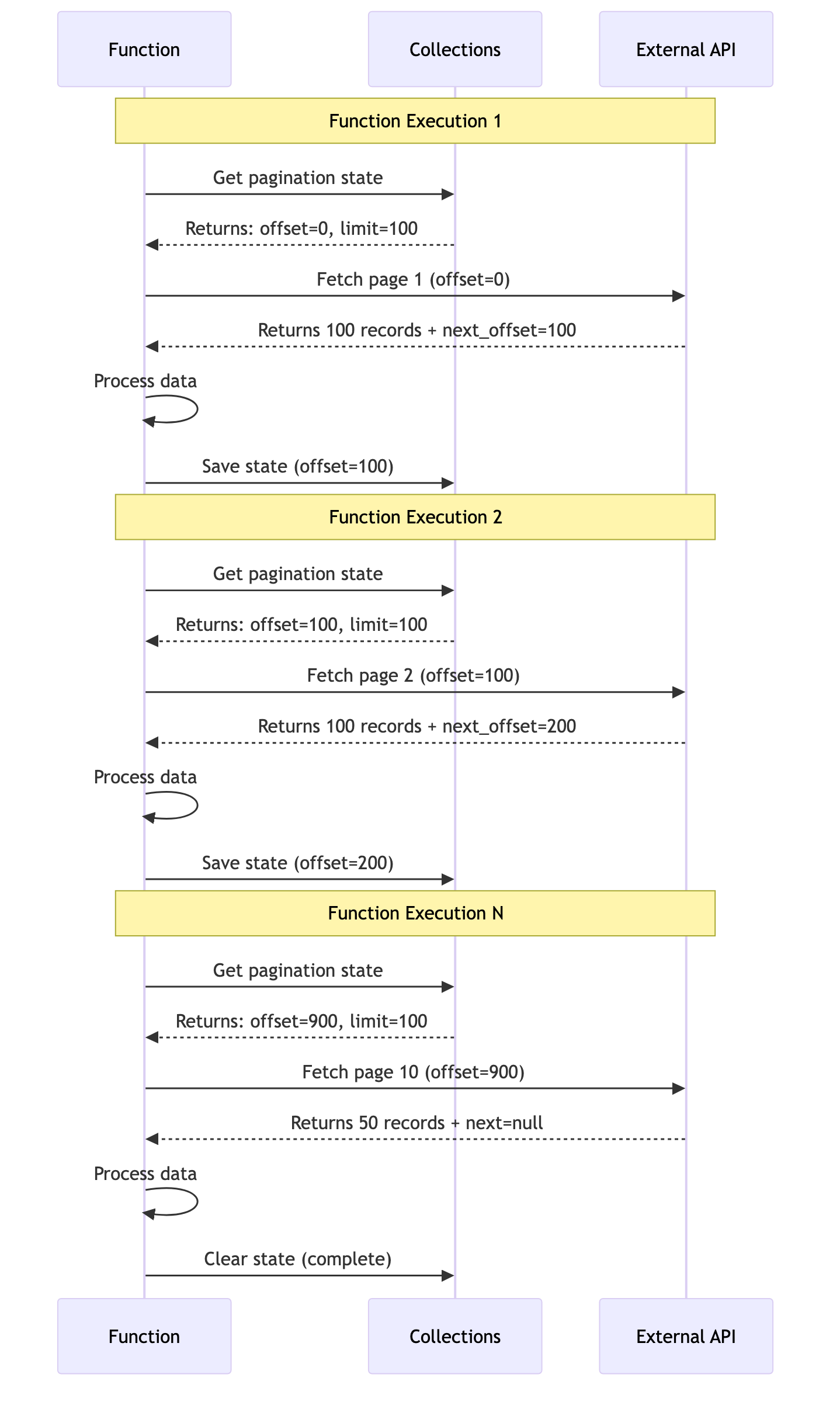
Figure 4: How pagination state flows across multiple function executions using collections
When This Approach Works
This pattern is perfect for:
- Small, predictable datasets: When you know you’re dealing with thousands, not millions, of records
- Fast APIs: When each API call completes in seconds
- Simple use cases: When you don’t need complex error recovery or scheduling
The Pokémon example might seem trivial, but the same pattern applies to any API that returns paginated data. The key concepts (state management, loop control, and next-page detection) are universal.
NOTE: If you’re working with Falcon Foundry collections themselves, you might also need to paginate through collection results. Check out the “Pagination in Falcon Fusion SOAR Workflows” section in the collections guide for details on using built-in workflow actions for collection pagination.
When function-based pagination exceeds the 15-minute execution limit, workflow-based pagination provides the solution.
Workflow-Based Pagination: The Production Solution
At 400 million IOCs, function-based pagination hits the 15-minute timeout while processing less than 1% of the data. Workflow-based pagination solves this by orchestrating multiple function calls, each handling a single page of data.
The solution? Move the pagination logic out of the function and into a Falcon Fusion SOAR workflow. Instead of one function trying to process everything, the workflow orchestrates multiple function calls, each handling a single page of data.
The Architecture Shift
Function-based approach (what failed):
Function execution:
  └─ Loop: Fetch page 1, 2, 3, ..., N until done (timeout!)
Workflow-based approach (what worked):
Workflow execution:
  ├─ Call function → Fetch page 1 → Returns next_token
  ├─ Call function → Fetch page 2 → Returns next_token
  ├─ Call function → Fetch page 3 → Returns next_token
  └─ ... continue for up to 100,000 iterations over 7 days

Figure 5: The architectural difference between function-based and workflow-based pagination
The Workflow Pattern
The following YAML shows the workflow structure from the Anomali ThreatStream sample. While you’ll typically build workflows using the Falcon Fusion SOAR visual designer, examining the YAML helps explain the pagination concepts:
name: Anomali Threat Intelligence Ingest
description: Anomali ThreatStream IOC ingestion on schedule every hour
trigger:
  next:
    - CreateVariable
  event: Schedule
  schedule:
    time_cycle: 0 0/1 * * *  # Run hourly
    skip_concurrent: true

actions:
  CreateVariable:
    next:
      - AnomaliIngest
    id: 702d15788dbbffdf0b68d8e2f3599aa4
    class: CreateVariable
    properties:
      variable_schema:
        properties:
          next:
            type: string
        type: object

  AnomaliIngest:
    next:
      - UpdateVariable
    id: functions.anomali-ioc-ingest.Anomali Ingest
    properties:
      limit: 1000
      repository: search-all
      status: active

  UpdateVariable:
    next:
      - Loop
    id: 6c6eab39063fa3b72d98c82af60deb8a
    class: UpdateVariable
    properties:
      WorkflowCustomVariable:
        next: ${data['AnomaliIngest.FaaS.anomali-ioc-ingest.AnomaliIngest.next']}

loops:
  Loop:
    display: While next exists And next is not equal to 0; 500 iterations; 2 hour limit
    for:
      condition: WorkflowCustomVariable.next:!null+WorkflowCustomVariable.next:!'0'
      max_execution_seconds: 7200
      max_iteration_count: 500
      sequential: true
    trigger:
      next:
        - AnomaliIngest2
    actions:
      AnomaliIngest2:
        next:
          - UpdateVariable2
        id: functions.anomali-ioc-ingest.Anomali Ingest
        properties:
          limit: 1000
          next: ${data['WorkflowCustomVariable.next']}
          repository: search-all
          status: active

      UpdateVariable2:
        id: 6c6eab39063fa3b72d98c82af60deb8a
        class: UpdateVariable
        properties:
          WorkflowCustomVariable:
            next: ${data['AnomaliIngest2.FaaS.anomali-ioc-ingest.AnomaliIngest.next']}
In the Falcon Fusion SOAR builder, this workflow looks as follows:
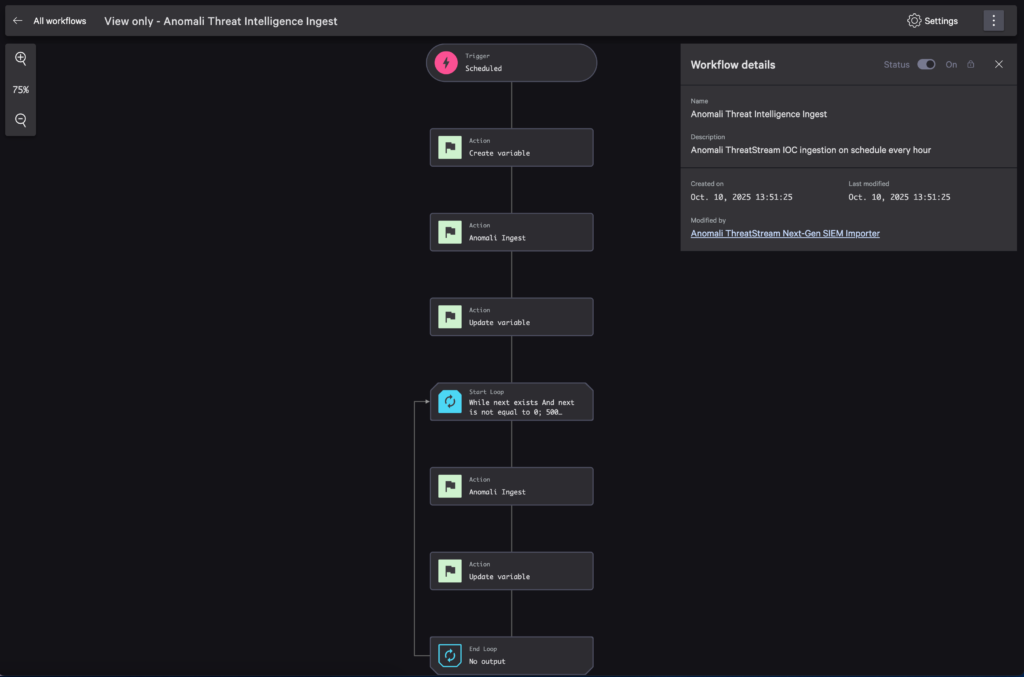
Figure 6: The Anomali pagination workflow in Falcon Fusion SOAR designer showing the loop structure
Breaking Down the Pattern
Let’s understand each piece:
1. Variable Initialization
CreateVariable:
  id: 702d15788dbbffdf0b68d8e2f3599aa4
  class: CreateVariable
  properties:
    variable_schema:
      properties:
        next:
          type: string
The workflow creates a variable to store the next token between iterations. This is the pagination state that flows through the entire workflow.
Note on Action IDs: The id: 702d15788dbbffdf0b68d8e2f3599aa4 references the CreateVariable action from the Falcon Fusion SOAR action catalog. These IDs ensure your workflow is portable across different CIDs – important for Falcon Foundry apps that customers will install in their own environments. The IDs are defined in the workflow YAML and remain consistent across customer deployments.
2. Initial Function Call
AnomaliIngest:
  id: functions.anomali-ioc-ingest.Anomali Ingest
  properties:
    limit: 1000
    repository: search-all
    status: active
The first function call doesn’t have a next parameter, so the function knows to start from the beginning.
3. Capture the Next Token
UpdateVariable:
  id: 6c6eab39063fa3b72d98c82af60deb8a
  class: UpdateVariable
  properties:
    WorkflowCustomVariable:
      next: ${data['AnomaliIngest.FaaS.anomali-ioc-ingest.AnomaliIngest.next']}
After each function execution, the workflow extracts the next token from the function’s response and stores it in the workflow variable. The UpdateVariable action uses id: 6c6eab39063fa3b72d98c82af60deb8a to reference the UpdateVariable action from the action catalog. Both UpdateVariable actions use the same ID since they perform the same operation.
4. The Loop
Loop:
  for:
    condition: WorkflowCustomVariable.next:!null+WorkflowCustomVariable.next:!'0'
    max_execution_seconds: 7200
    max_iteration_count: 500
The loop continues as long as:
- The
nexttoken exists (not null) - The
nexttoken is not “0” (because the workflow engine converts missing/null values to “0”) - We haven’t hit the iteration or time limit
Important gotcha: You might intuitively think you can just check for the existence of the next variable (:!null) to control termination. However, if your function doesn’t include a next field in the response, the workflow engine maps the missing variable to the value 0 (zero). Since 0 is not null, the loop will continue infinitely instead of terminating!
This means you must check both conditions:
WorkflowCustomVariable.next:!null– Variable existsWorkflowCustomVariable.next:!'0'– Variable is not the string “0”
Without the :!'0' check, when your function signals completion (by omitting next or returning next="0"), the workflow sees 0 which is not null, and the loop never stops. I learned through many workflow executions that both checks are necessary for proper termination.
5. Subsequent Function Calls
AnomaliIngest2:
  id: functions.anomali-ioc-ingest.Anomali Ingest
  properties:
    limit: 1000
    next: ${data['WorkflowCustomVariable.next']}  # Pass the next token
    repository: search-all
Each subsequent function call receives the next token, processes one page, and returns a new token. When you execute this workflow, you can watch it process pages in real-time:
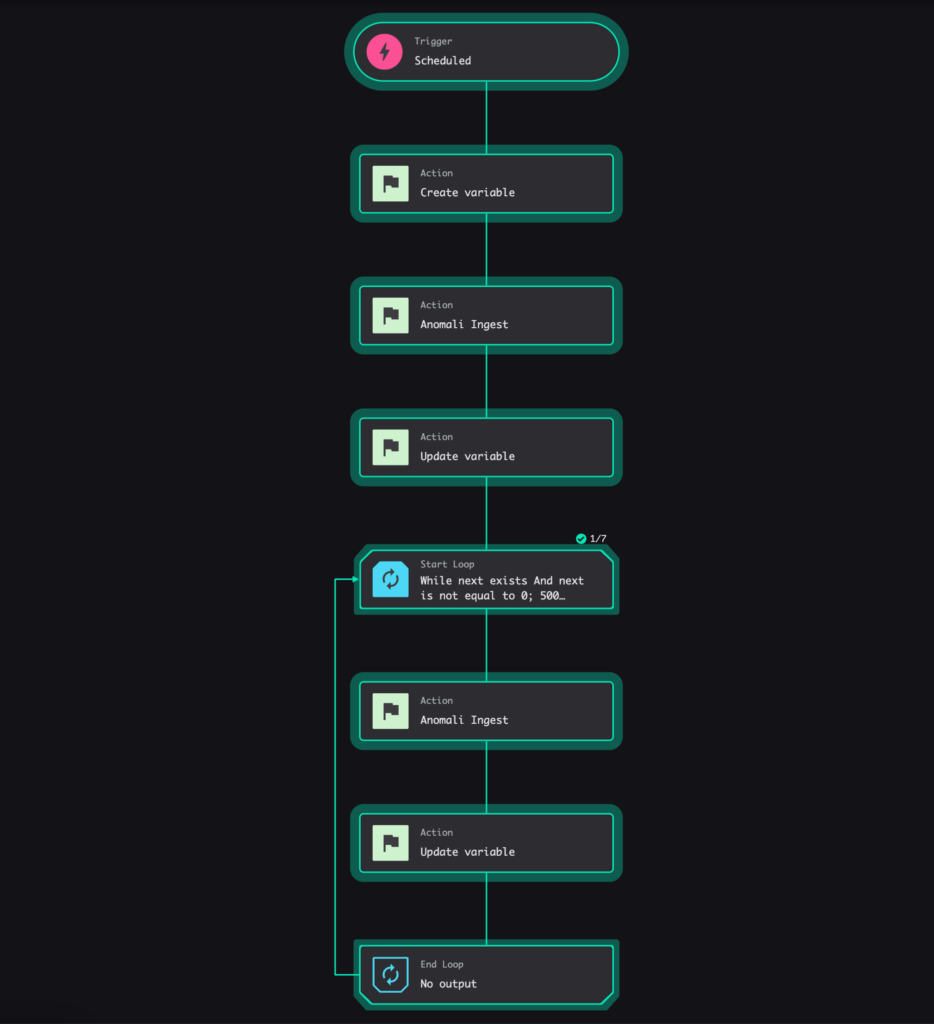
Figure 7: Workflow execution view showing the first iteration (1/7) of processing IOC data pages
The key part of the function that works with this workflow pattern is how it accepts a next token as input, processes a single page of data, and returns the next token for the subsequent iteration.
@FUNC.handler(method="POST", path="/ingest")
def on_post(request: Request, _config: dict | None, logger: Logger) -> Response:
    """
    Process a single page of IOCs.

    The workflow handles pagination by calling this function repeatedly
    with the 'next' token from the previous response.
    """
    # Get pagination parameters
    next_token = request.body.get("next", None)
    limit = request.body.get("limit", 1000)

    # Build query parameters
    if next_token:
        # Continuation call - use the token from the previous page
        query_params = {
            "order_by": "update_id",
            "limit": limit,
            "update_id__gt": next_token
        }
    else:
        # Initial call - start from the beginning or last checkpoint
        last_update = get_last_update_id(api_client, headers, logger)
        query_params = {
            "order_by": "update_id",
            "limit": limit,
            "update_id__gt": last_update.get("update_id", "0") if last_update else "0"
        }

    # Fetch one page of IOCs
    iocs, meta = fetch_iocs_from_anomali(api_integrations, query_params, logger)

    # Process and store the IOCs (details omitted for brevity)
    csv_files = process_iocs_to_csv(iocs, temp_dir, existing_files, logger)
    upload_results = upload_csv_files_to_ngsiem(csv_files, repository, logger)

    # Determine if there's more data
    next_token_value = extract_next_token_from_meta(meta, iocs, logger)

    response_body = {
        "message": f"Processed {len(iocs)} IOCs",
        "total_iocs": len(iocs)
    }

    # Only include next token if there's more data
    if next_token_value:
        response_body["next"] = next_token_value

    return Response(
        body=response_body,
        code=200
    )
The function’s job is simple:
- Accept a
nexttoken (or start fresh if none provided) - Fetch and process ONE page of data
- Return the next token for the workflow to use
The Real-World Numbers
This architecture achieves the following results with the Anomali integration:
Test account (65,000 IOCs):
- Single function execution: ~10 minutes
- No workflow needed
Production account (400 million IOCs without filtering):
- Initial approach (function-based): Timeout at 15 minutes
- Workflow approach: Required for this scale
- Each function execution: Processes 1,000 IOCs per iteration
- Total workflow iterations: Hundreds to thousands, depending on data volume
- Success rate: 100% with automatic recovery
After applying feed_id filter (7,000 IOCs):
- Workflow completed in ~1 minute (7 iterations × ~7-10 seconds each)
- Each function execution: 7-10 seconds processing 1,000 IOCs
- Scalable architecture in place for future growth
The workflow approach not only solves the immediate scaling problem but provides confidence that the integration handles variable data volumes.
Why This Pattern Works
The workflow-based approach succeeds because:
- Each function execution is short: 7-10 seconds per 1,000 IOCs means no timeout risk
- State is managed externally: The workflow handles pagination, the function handles processing
- Built-in resilience: If a function fails, the workflow can retry just that page
- Observable progress: You can see each iteration in the Fusion SOAR UI
- Schedulable: The workflow can run on a schedule without any external triggers
This is the pattern you want for production integrations where reliability and scale matter.
But here’s the thing about production integrations: perfect code doesn’t exist. You’ll hit rate limits, network glitches, and API hiccups. The difference between a system that works and one that falls apart? Error handling.
Handling Rate Limits and Errors
Rate limiting becomes critical at scale. When processing 400 million IOCs, parallel workflows can trigger API rate limiting, resulting in 429 (Too Many Requests) errors. Concurrent processing of multiple IOC types (ip, url, hash, email, domain) simultaneously can overwhelm APIs designed for sequential access. Robust error handling transitions from nice-to-have to essential for production integrations.
Exponential Backoff Pattern
The retry logic from the Anomali connector handles rate limiting gracefully:
def fetch_iocs_from_anomali(
    api_integrations: APIIntegrations,
    params: dict,
    logger: Logger,
    max_retries: int = 5
) -> tuple[list[dict], dict]:
    """Fetch IOCs with exponential backoff for rate limiting."""

    for attempt in range(max_retries + 1):
        try:
            logger.info(f"Calling Anomali API with params (attempt {attempt + 1}): {params}")

            # Use the API Integration to call Anomali Intelligence endpoint
            response = api_integrations.execute_command_proxy(
                definition_id="Anomali API",
                operation_id="Intelligence",
                params={
                    "query": params
                }
            )

            logger.info(f"Anomali API response status: {response['status_code']}")

            # Check for rate limiting in multiple formats
            is_rate_limited = False
            rate_limit_message = ""

            # Direct 429 status
            if response["status_code"] == 429:
                is_rate_limited = True
                rate_limit_message = response.get("body", {}).get("errors", "Rate limit exceeded")

            # Check for 207 Multi-Status with embedded 429 errors
            elif response["status_code"] == 207:
                error_body = response.get("body", {})
                errors = error_body.get("errors", [])

                # Check if any embedded error is a 429
                for error in errors:
                    if isinstance(error, dict) and error.get("code") == 429:
                        is_rate_limited = True
                        rate_limit_message = error.get(
                            "message", "Rate limit exceeded in multi-status response"
                        )
                        break

            # Handle rate limiting with Retry-After header or exponential backoff
            if is_rate_limited:
                if attempt < max_retries:
                    # Check for Retry-After header (standard for HTTP 429)
                    retry_after_header = response.get("headers", {}).get("Retry-After")
                    if retry_after_header:
                        # Retry-After can be seconds (int) or HTTP date (string)
                        try:
                            retry_after = int(retry_after_header)
                        except (ValueError, TypeError):
                            # If not an integer, fall back to exponential backoff
                            retry_after = 5 * (2 ** attempt) + random.uniform(0, 2)
                    else:
                        # No Retry-After header, use exponential backoff with jitter
                        retry_after = 5 * (2 ** attempt) + random.uniform(0, 2)

                    logger.warning(
                        f"Rate limited ({rate_limit_message}), retrying in "
                        f"{retry_after:.1f}s (attempt {attempt + 1}/{max_retries})"
                    )
                    time.sleep(retry_after)
                    continue

                raise APIIntegrationError(
                    f"Rate limit exceeded after {max_retries} retries: {rate_limit_message}"
                )

            if response["status_code"] not in [200, 207]:
                error_message = response.get("body", {}).get("errors", "Unknown error")
                raise APIIntegrationError(
                    f"API call failed with status {response['status_code']}: {error_message}"
                )

            response_data = response.get("body", {})
            objects = response_data.get("objects", [])
            meta = response_data.get("meta", {})

            logger.info(f"Fetched {len(objects)} IOCs from Anomali (attempt {attempt + 1})")

            return objects, meta

        except APIIntegrationError:
            # Re-raise API integration errors (including rate limits)
            raise
        except Exception as e:
            if attempt < max_retries:
                logger.warning(f"Error on attempt {attempt + 1}: {str(e)}, retrying...")
                time.sleep(1 + attempt)  # Progressive delay for other errors
                continue

            logger.error(
                f"Error fetching IOCs from Anomali after {max_retries + 1} attempts: {str(e)}"
            )
            raise
This retry logic handles transient failures gracefully while avoiding infinite retry loops. The code checks for the standard Retry-After header first (which tells you exactly when to retry), then falls back to exponential backoff with jitter when the header isn’t present.
The Retry-After header is the HTTP standard way APIs communicate rate limit timing. It can contain either:
- An integer representing seconds to wait (e.g.,
Retry-After: 30) - An HTTP date indicating when to retry (e.g.,
Retry-After: Wed, 21 Oct 2025 07:28:00 GMT)
Respecting the Retry-After header is more accurate than guessing with exponential backoff, and it’s considerate to the API provider’s rate limiting policies.
The retry behavior differs depending on whether the API provides the Retry-After header:
Without Retry-After header (exponential backoff):

Figure 8a: Exponential backoff when API doesn’t provide Retry-After header – delays increase exponentially (5s, 10s, 20s)
With Retry-After header (respecting API guidance):
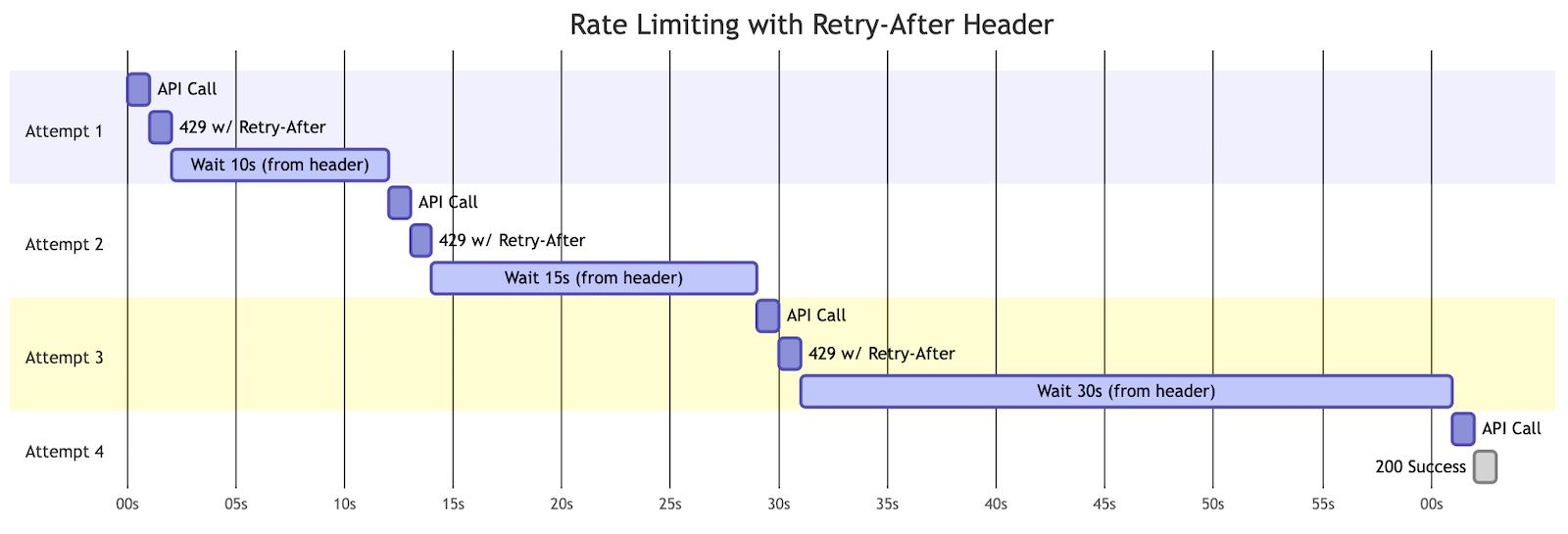
Figure 8b: Using Retry-After header when API provides it – respecting the exact timing the API requests (10s, 15s, 30s)
The code checks for the header first and falls back to exponential backoff when it’s not present, giving you the best of both approaches.
Key Error Handling Principles
Distinguish Between Error Types
Not all errors should be retried:
# Retry these (transient errors)
- 429 (Rate Limit)
- 500 (Server Error)
- 502 (Bad Gateway)
- 503 (Service Unavailable)
- Network timeouts

# Don't retry these (permanent errors)
- 400 (Bad Request)
- 401 (Unauthorized)
- 403 (Forbidden)
- 404 (Not Found)
Add Jitter to Prevent Thundering Herd
Jitter is adding random variation to retry delays. Without it, multiple functions that hit a rate limit at the same time will all retry at precisely the same moment, potentially overwhelming the API again.
# Bad: All retries happen at exactly the same time
retry_after = 5 * (2 ** attempt)

# Good: Add randomness to spread out retries
retry_after = 5 * (2 ** attempt) + random.uniform(0, 2)
This prevents the “thundering herd” problem where synchronized retries create repeated traffic spikes.
Log Everything
Detailed logging saved me countless hours of debugging:
logger.info(f"Calling Anomali API with params (attempt {attempt + 1}): {params}")
logger.warning(
    f"Rate limited ({rate_limit_message}), retrying in "
    f"{retry_after:.1f}s (attempt {attempt + 1}/{max_retries})"
)
logger.error(
    f"Error fetching IOCs from Anomali after {max_retries + 1} attempts: {str(e)}"
)
In Falcon Foundry, these logs appear in the function execution details, making it easy to trace exactly what happened.
Set Reasonable Limits
max_retries = 5 # Don't retry forever
You need a balance between resilience and responsiveness. Five retries with exponential backoff gives you about 65 seconds of retry attempts, which handles most transient issues without creating excessively long waits.
FalconPy’s Automatic Token Renewal
One often-overlooked benefit of using the FalconPy SDK when calling Falcon APIs (instead of raw HTTP requests) is its automatic bearer token renewal. During long pagination workflows that might take hours, authentication tokens can expire. FalconPy detects stale tokens and automatically renews them, preventing pagination failures due to authentication timeouts. This is especially valuable for workflow-based pagination where a single workflow might process large volumes of data over extended periods.
Handling State Consistency
When errors occur mid-pagination, you need to ensure you don’t lose data or process duplicates:
# Process IOCs and create CSV files
csv_files, process_stats = process_iocs_to_csv(iocs, temp_dir, existing_files, logger)

# Upload CSV files to Falcon Next-Gen SIEM
upload_results = upload_csv_files_to_ngsiem(csv_files, repository, logger)

# Update collections with latest state - only after successful processing and upload
if meta and iocs:
    # Get the highest update_id from processed IOCs
    update_ids = [str(ioc['update_id']) for ioc in iocs if 'update_id' in ioc]
    max_update_id = max(update_ids) if update_ids else "0"

    update_data = {
        "created_timestamp": datetime.now(timezone.utc).isoformat(),
        "total_count": meta.get("total_count", len(iocs)),
        "next_url": meta.get("next") or "",  # Handle null/None case
        "update_id": max_update_id
    }

    # Save state for the appropriate type (single type or all types)
    save_update_id(api_client, headers, update_data, type_filter, logger)
If processing or uploading fails, the checkpoint isn’t updated, so the next execution will retry the same page. This “at-least-once” processing is safer than risking data loss.
Workflow-Level Error Handling
Workflows provide additional error handling options:
- Retry policies: Configure automatic retries for function failures
- Error branches: Route to different actions based on error types
- Notifications: Alert on persistent failures
In the Anomali workflow, I rely on the function’s built-in retry logic rather than workflow-level retries, but both approaches are valid depending on your needs.
The key insight: plan for failure from the start. Rate limits and transient errors aren’t edge cases. They’re normal operating conditions for production integrations.
Speaking of things that go wrong: pagination bugs are some of the sneakiest issues you’ll encounter. They hide until you hit exactly the wrong edge case in production. The following testing strategy will help you catch them before your users do.
Testing Your Pagination Logic
The real test of pagination code is whether it handles empty pages, boundary conditions, and flaky APIs. Debugging production issues requires comprehensive testing: “it works on my test data” provides limited confidence for production deployments. The following testing strategy helps catch bugs before production.
Unit Testing with pytest
The Anomali ThreatStream Foundry sample app includes comprehensive unit tests. The following examples demonstrate key pagination testing patterns from the actual project:
import unittest
from unittest.mock import MagicMock, patch
from crowdstrike.foundry.function import Request
import main


class AnomaliFunctionTestCase(unittest.TestCase):
    """Test case class for Anomali function handler tests."""

    def test_fetch_iocs_rate_limit_max_retries(self):
        """Test fetch_iocs_from_anomali when rate limit exceeds max retries."""
        mock_api_integrations = MagicMock()
        mock_logger = MagicMock()

        # Mock consistent rate limiting
        mock_api_integrations.execute_command_proxy.return_value = {
            "status_code": 429,
            "body": {"errors": "Rate limit exceeded"}
        }

        with patch('main.time.sleep'):
            with self.assertRaises(main.APIIntegrationError) as context:
                main.fetch_iocs_from_anomali(mock_api_integrations, {}, mock_logger, max_retries=2)

            self.assertIn("Rate limit exceeded after 2 retries", str(context.exception))

    def test_fetch_iocs_retry_after_header_integer(self):
        """Test fetch_iocs_from_anomali respects Retry-After header with integer seconds."""
        mock_api_integrations = MagicMock()
        mock_logger = MagicMock()

        # Mock rate limiting with Retry-After header (integer seconds)
        mock_api_integrations.execute_command_proxy.side_effect = [
            {
                "status_code": 429,
                "headers": {"Retry-After": "30"},
                "body": {"errors": "Rate limit exceeded"}
            },
            {
                "status_code": 200,
                "body": {
                    "objects": [{"id": 1, "itype": "ip", "ip": "1.2.3.4"}],
                    "meta": {"total_count": 1, "next": None}
                }
            }
        ]

        with patch('main.time.sleep') as mock_sleep:
            iocs, meta = main.fetch_iocs_from_anomali(mock_api_integrations, {}, mock_logger, max_retries=1)

            self.assertEqual(len(iocs), 1)
            # Verify it used the Retry-After value (30 seconds)
            mock_sleep.assert_called_once_with(30)

    def test_fetch_iocs_retry_after_header_invalid_fallback(self):
        """Test fetch_iocs_from_anomali falls back to exponential backoff for invalid Retry-After."""
        mock_api_integrations = MagicMock()
        mock_logger = MagicMock()

        # Mock rate limiting with invalid Retry-After header (HTTP date string that can't be parsed)
        mock_api_integrations.execute_command_proxy.side_effect = [
            {
                "status_code": 429,
                "headers": {"Retry-After": "Wed, 21 Oct 2024 07:28:00 GMT"},
                "body": {"errors": "Rate limit exceeded"}
            },
            {
                "status_code": 200,
                "body": {
                    "objects": [{"id": 1, "itype": "ip", "ip": "1.2.3.4"}],
                    "meta": {"total_count": 1, "next": None}
                }
            }
        ]

        with patch('main.time.sleep') as mock_sleep, \
             patch('main.random.uniform', return_value=1.0):
            iocs, meta = main.fetch_iocs_from_anomali(mock_api_integrations, {}, mock_logger, max_retries=1)

            self.assertEqual(len(iocs), 1)
            # Verify it fell back to exponential backoff: 5 * (2 ** 0) + 1.0 = 6.0
            mock_sleep.assert_called_once_with(6.0)

    def test_extract_next_token_from_meta_variations(self):
        """Test extract_next_token_from_meta with different URL parameter variations."""
        mock_logger = MagicMock()

        test_cases = [
            # search_after parameter (highest priority)
            ({
                "next": "https://api.example.com/v1/intelligence/?search_after=12345&limit=1000"
            }, [{"update_id": "999"}], "12345"),

            # update_id__gt parameter
            ({
                "next": "https://api.example.com/v1/intelligence/?update_id__gt=67890&limit=1000"
            }, [{"update_id": "999"}], "67890"),

            # Fallback to last IOC update_id when no recognized parameters
            ({
                "next": "https://api.example.com/v1/intelligence/?some_other_param=xyz&limit=1000"
            }, [{"update_id": "fallback_id"}], "fallback_id"),

            # No next URL - should return None
            ({}, [{"update_id": "999"}], None),

            # ... (additional test cases omitted for brevity)
        ]

        for meta, iocs, expected_result in test_cases:
            result = main.extract_next_token_from_meta(meta, iocs, mock_logger)
            self.assertEqual(result, expected_result)

    @patch('main.APIIntegrations')
    @patch('main.APIHarnessV2')
    def test_no_iocs_returns_no_next_field(self, mock_api_harness_class, mock_api_integrations_class):
        """Test that when no IOCs are found, next field is omitted from response."""
        # ... (setup code omitted for brevity)

        # Mock Anomali API response with no objects
        mock_api_integrations.execute_command_proxy.return_value = {
            "status_code": 200,
            "body": {
                "objects": [],  # No IOCs
                "meta": {"total_count": 0, "next": None}
            }
        }

        # ... (mock setup continues)

        response = main.on_post(request, _config=None, logger=mock_logger)

        # Verify response structure
        self.assertEqual(response.code, 200)
        self.assertEqual(response.body["total_iocs"], 0)

        # Critical test: verify next field is omitted when pagination complete
        self.assertNotIn("next", response.body)


# The full test suite includes 50+ tests covering edge cases, error scenarios,
# state management, CSV processing, and more. See test_main.py for complete coverage.
Running the full test suite validates all your pagination logic:

Figure 9: Unit test output showing successful pagination test cases
Local Testing Workflow
Before deploying, I recommend you test locally with real API calls. This is where you’ll catch most pagination bugs without the slow deploy/release/install cycle.
# Set up environment variables
export APP_ID="your-test-app-id"
export FALCON_CLIENT_ID="your-client-id"
export FALCON_CLIENT_SECRET="your-client-secret"

# Activate virtual environment
cd functions/your-function
python -m venv venv
source venv/bin/activate

# Install dependencies
pip install -r requirements.txt

# Run the function locally
python main.py
Then make test requests using HTTPie or curl:
# HTTPie: Initial call
http POST :8081 method=POST url=/pagination-example "body[limit]=100"

# HTTPie: Continuation call with next token
http POST :8081 method=POST url=/pagination-example "body[limit]=100" "body[next]=token_from_previous_response"

# curl: Initial call
curl -X POST http://localhost:8081 -H "Content-Type: application/json" \
  -d '{"method": "POST", "url": "/pagination-example", "body": {"limit": 100}}'

# curl: Continuation call with next token
curl -X POST http://localhost:8081 -H "Content-Type: application/json" \
  -d '{"method": "POST", "url": "/pagination-example", "body": {"limit": 100, "next": "token_from_previous_response"}}'
Simulating Workflow Behavior Locally
Testing workflow-based pagination logic locally before deployment significantly reduces debugging time and iteration cycles. To simulate what a workflow will do:
1. Initial call (no next token):
initial=$(curl -s -X POST http://localhost:8081 \
    -H "Content-Type: application/json" \
    -d @- <<EOF
{
    "method": "POST",
    "url": "/ingest",
    "body": {
        "repository": "search-all",
        "status": "active",
        "limit": 25
    }
}
EOF
)

echo "$initial" | python -m json.tool
2. Extract the next token:
next_token=$(echo "$initial" | python -c "
import json, sys
data = json.load(sys.stdin)
if 'body' in data and 'next' in data['body']:
    next_val = data['body']['next']
    # Check if next token exists and is not None
    if next_val is not None:
        print(next_val)
")

echo "Next token: '$next_token'"
3. Pagination call (with next token):
loop=$(curl -s -X POST http://localhost:8081 \
    -H "Content-Type: application/json" \
    -d @- <<EOF
{
    "method": "POST",
    "url": "/ingest",
    "body": {
        "repository": "search-all",
        "status": "active",
        "limit": 25,
        "next": "$next_token"
    }
}
EOF
)

echo "$loop" | python -m json.tool
This approach lets you verify:
- Initial calls create proper starting state
- Pagination calls use next tokens correctly
- Termination happens when
nextfield is omitted from the response - The function handles all page transitions properly
Pro tip: Write a bash script that loops through multiple pages automatically. The direct_workflow_test.sh script in the Anomali sample shows exactly how to do this. You’ll catch pagination bugs in minutes instead of hours spent deploying and debugging workflows.
Once your function passes these local workflow simulations, deploying the actual workflow is just connecting pieces you’ve already validated.
Testing the Full Workflow
Once your function is working, test the complete workflow:
- Deploy to Foundry: Use
foundry apps deployto deploy your function and workflow - Manual workflow execution: Trigger the workflow manually in the Fusion UI
- Monitor execution: Watch the workflow iterations in real-time
- Check the results: Verify that all data was processed correctly
- Test recovery: Stop a running workflow mid-execution and restart it
The Falcon Fusion SOAR UI gives you visibility into each iteration, making it easy to spot issues:
- Which iteration failed?
- What was the next token value?
- How long did each iteration take?
- Did the workflow complete or hit a limit?
Continuous Integration
Add pagination tests to your CI pipeline. The Anomali ThreatStream sample includes a GitHub Actions workflow:
# .github/workflows/main.yml
name: Test Anomali IOC Ingest Function

on: [push, pull_request]

permissions:
  contents: read

jobs:
  test:
    runs-on: ubuntu-latest
    steps:
      - uses: actions/checkout@v5

      - name: Setup Python
        uses: actions/setup-python@v6
        with:
          python-version: '3.13'
          cache: 'pip'
          cache-dependency-path: 'functions/anomali-ioc-ingest/requirements.txt'

      - name: Install dependencies
        run: |
          pip install -r requirements.txt
          pip install pytest pytest-cov
        working-directory: functions/anomali-ioc-ingest

      - name: Run tests with coverage
        run: pytest test_main.py --cov=main --cov-report=term
        working-directory: functions/anomali-ioc-ingest
For GitLab CI, the equivalent configuration looks like:
# .gitlab-ci.yml
test:
  image: python:3.13
  stage: test
  before_script:
    - cd functions/anomali-ioc-ingest
    - pip install -r requirements.txt
    - pip install pytest pytest-cov
  script:
    - pytest test_main.py --cov=main --cov-report=term
  only:
    - merge_requests
    - main
Automated tests catch pagination bugs before they reach production, especially when you’re updating to handle new API versions or pagination patterns.
We’ve covered a lot of ground: from basic patterns to production workflows to error handling. Now let’s bring it all together with some practical decision-making guidance you can reference when building your next integration.
Key Takeaways and Decision Guide
After building multiple pagination integrations and learning from my mistakes, here’s the condensed wisdom I wish I’d had from the start.
The Core Decision: Functions vs Workflows
| Factor | Use Functions | Use Workflows |
|---|---|---|
| Data size | < 10,000 records | > 10,000 or unknown |
| API speed | Fast (\< 1 sec/page) | Slow or rate-limited |
| Predictability | Dataset size is known | Size varies or is unknown |
| Development time | Faster to build | More setup required |
| Reliability needs | Occasional failures OK | Must be bulletproof |
| Execution time | < 10 minutes total | Potentially hours or days |
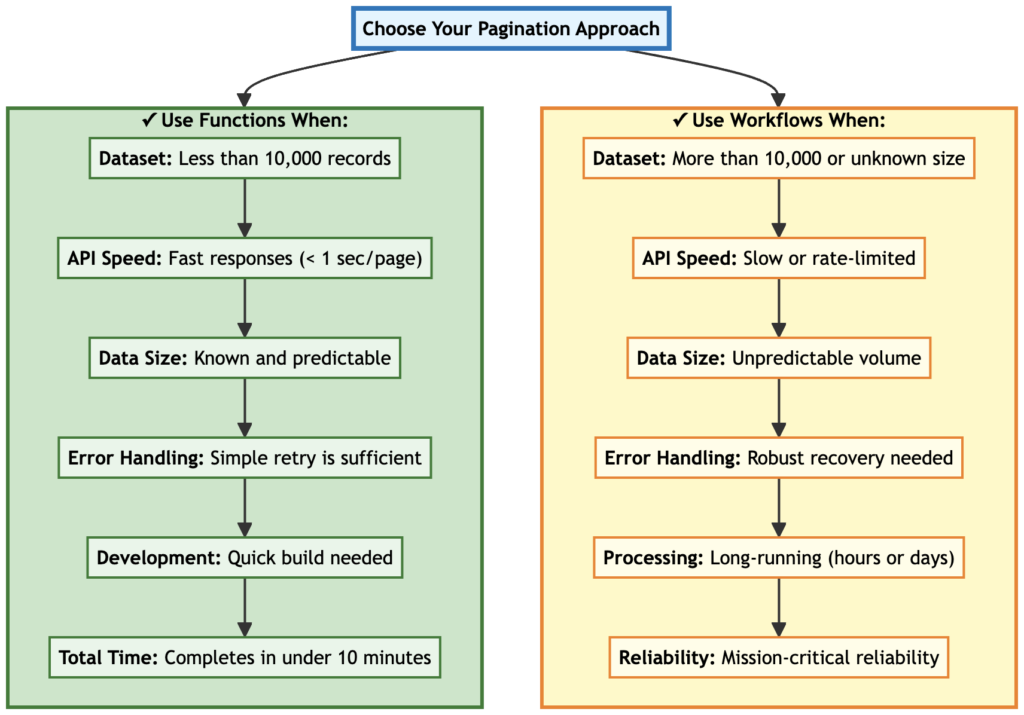
Figure 10: Decision matrix showing when to use functions versus workflows for pagination
Best Practices Checklist
For All Pagination Implementations:
- Always save state before timeout limits
- Handle empty result sets gracefully
- Test with both small and large datasets
- Log pagination progress and errors
- Implement exponential backoff for retries
- Validate the pagination token format
- Document the expected data volume
For Function-Based Pagination:
- Use collections for state persistence
- Include a reset endpoint for testing
- Set reasonable timeouts and limits
- Process data in chunks to manage memory
- Monitor execution time to avoid timeouts
For Workflow-Based Pagination:
- Keep function execution time under 1 minute per page
- Use workflow variables to pass the next token
- Set realistic iteration limits (start with 500-1000)
- Configure the loop condition correctly (
next:!null+next:!'0') to handle the workflow engine’s behavior - Test the complete workflow end-to-end
- Monitor workflow execution in the Fusion UI
Common Pitfalls to Avoid
1. Not planning for scale: Starting with function-based pagination when you should have used workflows (my mistake!)
2. Missing the final page: Forgetting to handle the case when there’s no more data
# Bad - function always includes 'next' field
response_body = {
    "total_iocs": len(iocs),
    "next": meta.get('next')  # Will be None when done
}

# Good - omit 'next' field when pagination is complete (Pythonic approach)
response_body = {"total_iocs": len(iocs)}
if meta.get('next'):
    response_body["next"] = meta.get('next')
3. Infinite loops: Not properly checking loop termination conditions
# Bad - loops forever if next is missing
while True:
    # fetch and process

# Good - explicit termination check
while next_token:
    # fetch and process
    next_token = fetch_next_page()
4. Losing state on errors: Saving state before confirming successful processing
# Bad - state saved even if processing fails
save_pagination_state(next_token)
process_data(data)

# Good - only save state after success
process_data(data)
save_pagination_state(next_token)
5. Trusting hasNextPage fields: Some APIs provide a hasNextPage boolean but don’t reliably update it. Several APIs provide this field but don’t update it reliably across all pagination scenarios. Instead, rely on checking if the next token exists:
# Less reliable - hasNextPage may not be accurate
if response.get('hasNextPage'):
    continue_pagination()

# More reliable - check for actual next token
next_token = response.get('meta', {}).get('next')
if next_token:
    continue_pagination()
6. Ignoring rate limits: Not implementing retry logic with backoff
7. Poor logging: Not logging enough detail to debug issues in production
Quick Reference: Pagination Patterns
| Pattern | How to Continue | Stop Condition |
|---|---|---|
| Offset/Limit | offset += limit |
offset >= total or empty results |
| Cursor | Use cursor.next from response |
cursor.next is null |
| Page Number | page++ |
page >= total_pages |
| Link Header | Parse rel="next" link |
No rel="next" link |
| Search After | Use last sort values | Empty results |
| Timestamp | Use next_timestamp |
Reach current time or empty results |
When Things Go Wrong
Problem: Workflow loops forever
- Check: Is your function omitting the
nextfield when done? - Check: Is the loop condition checking for both null and “0” (due to workflow engine behavior)?
Problem: Duplicate data processing
- Check: Are you saving state before processing completes?
- Check: Is your API returning the same data multiple times?
Problem: Missing data
- Check: Are you handling pagination tokens correctly?
- Check: Is data being created while you paginate?
Problem: Function timeout
- Solution: Move to workflow-based pagination
You’ve got the knowledge, the patterns, and the code examples. Now it’s time to build something real.
Next Steps
The difference between understanding pagination and mastering it? Actually implementing it. Below is a roadmap for putting these patterns into practice:
Try the Sample Apps
Check out foundry-sample-anomali-threatstream on GitHub to see a production implementation of workflow-based pagination. The sample includes:
- Complete workflow YAML configuration
- Production-grade function code with error handling
- Unit tests for pagination logic
- Documentation for deployment and testing
NOTE: You’ll need an Anomali ThreatStream account with API access to install this sample. Anomali follows an enterprise sales model, so you’ll need to request a demo to get access. However, you can study the code and adapt the patterns to any paginated API integration.
Additional Resources
- Dive into Falcon Foundry Functions with Python: Deep dive into Falcon Foundry functions
- Getting Started with Falcon Foundry Collections: Learn about state management with collections
- Create Custom Actions for SOAR with Falcon Foundry: Build workflow actions
- Foundry CLI Documentation: Command-line tool for Falcon Foundry development
- FalconPy Documentation: Python SDK for CrowdStrike APIs
Start Building
The best way to learn pagination is to implement it:
- Identify an API you need to integrate: Pick one with clear pagination documentation
- Estimate the data volume: Will it fit in function execution time?
- Build your function first: Implement the pagination logic in a function you can test locally
- Simulate workflow behavior: Use curl/bash scripts to test the complete pagination flow locally
- Add error handling: Implement retries and logging
- Test thoroughly: Cover edge cases and large datasets
- Add the workflow: Once the function is solid, create the workflow orchestration
- Monitor in production: Watch for issues and optimize
Remember: develop functions first, add workflows second. Testing locally is infinitely faster than the deploy/release/install cycle. Get your pagination logic working in a function, validate it with local workflow simulations, then deploy the workflow knowing it’ll work.
What’s Next?
Ready to implement pagination in your own Falcon Foundry projects? Here are your next steps:
- Start Small: Pick a simple API with clear pagination docs and build your first function
- Join the Community: Connect with other Foundry developers in CrowdStrike’s Foundry Developer Community
- Explore the Sample: Check out the complete foundry-sample-anomali-threatstream implementation
- Build Something Real: Take a current manual data collection process and automate it with Foundry
The most important lesson from production-scale integrations: always think about scale from day one. Choose your architecture based on your data volume, not your development convenience. Functions are great for quick wins and small datasets. Workflows are essential for production-scale integrations.
Connect with other Falcon Foundry developers in CrowdStrike’s Foundry Developer Community to share pagination challenges and implementation patterns.