Falcon Fusion SOAR Event Queries: When and How to Go Schemaless
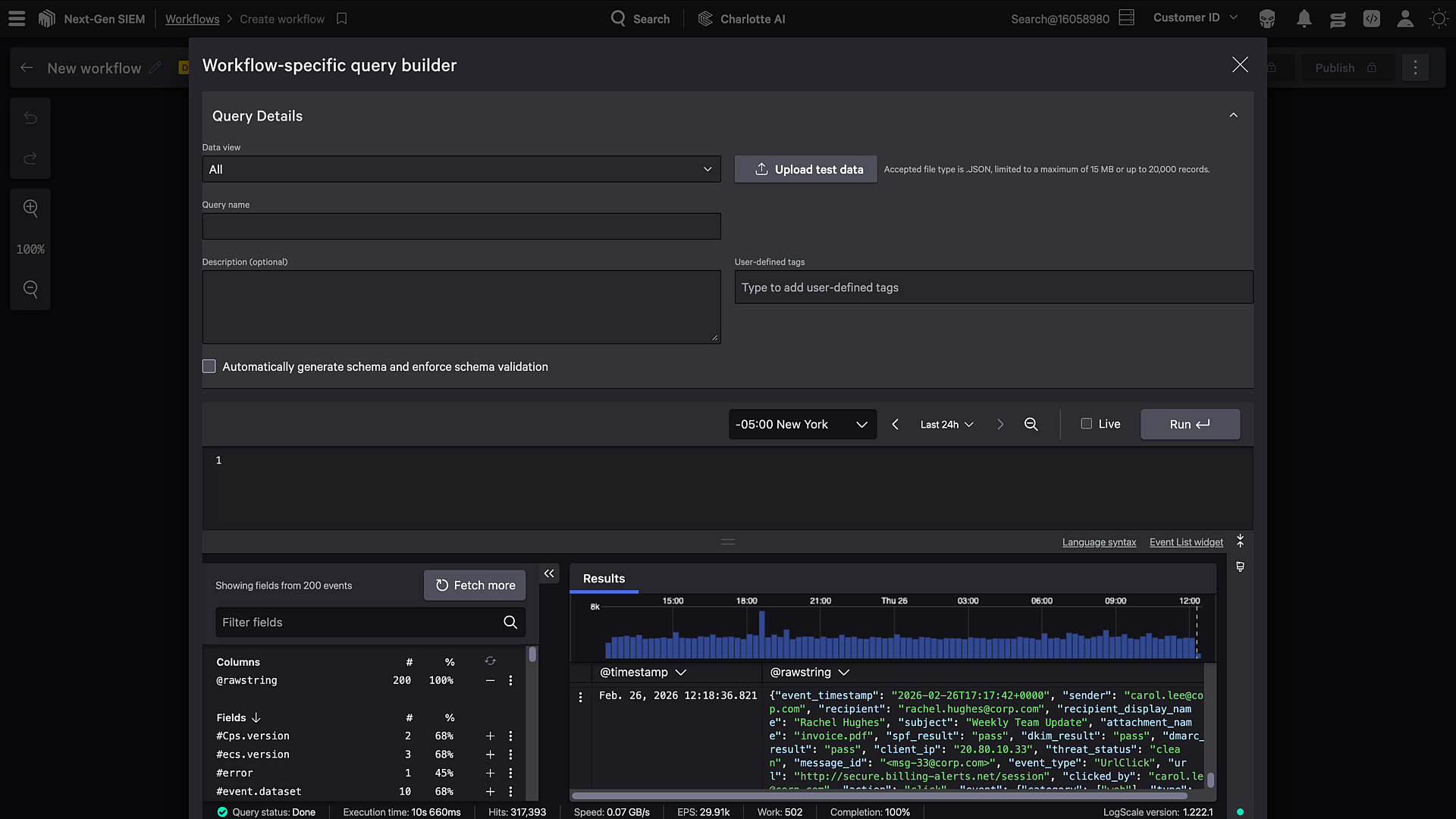
You’ve built a complex Falcon LogScale query that returns exactly what you need, but your Falcon Fusion SOAR workflow keeps failing with schema validation errors. The data structure varies based on conditions, and there’s no way to define a fixed schema upfront.
This is a common challenge when working with dynamic data sources like Falcon Next-Gen SIEM detection enrichment. Schema validation exists for good reasons, but sometimes your data doesn’t fit neatly into a predefined structure. That’s where the “No Schema” option comes in.
In this post, you’ll learn why schema validation exists and when it becomes problematic, how to identify scenarios where schemaless queries make sense, how to enable and configure schemaless event queries, and best practices for handling variable response structures in your workflows.
Table of Contents:
- Understanding Schema Validation in Falcon Fusion SOAR
- When Schema Validation Becomes a Problem
- When to Use the No Schema Option
- How to Enable Schemaless Event Queries
- Working with Schemaless Data in Your Workflow
- Example: Enriching Falcon Next-Gen SIEM Detections
- Recommended Practices
- Learn More About Falcon Fusion SOAR
Before you begin, ensure you have the following:
Prerequisites:
- Falcon Fusion SOAR
- Falcon Next-Gen SIEM
- Charlotte AI (optional)
Understanding Schema Validation in Falcon Fusion SOAR
When you create an Event Query action in Falcon Fusion SOAR, the system generates a JSON schema based on your initial query results. This schema defines the expected structure of your data: field names, types, and which fields are required.
Schema validation provides real benefits. It catches data type mismatches before they break downstream workflow steps. It enables IntelliSense and autocomplete when referencing query results. And it documents what data structure your workflow expects, making it easier for others to understand and maintain.
By default, generated schemas don’t mark all fields as required. This gives you some flexibility when fields are occasionally missing. But the schema still defines the expected field names and types.
The trouble starts when your query results don’t always match the initial schema. You might see errors like:
Schema validation failed: unexpected field 'customField1' in response
Or the workflow silently drops fields that weren’t in the original schema, leaving you with incomplete data.
When Schema Validation Becomes a Problem
Schema validation works great for predictable queries. If you’re querying a well-defined data source where the structure is consistent, schemas protect you from surprises.
But several scenarios make fixed schemas impractical.
Dynamic aggregations are a common culprit. If your query groups data by variable fields, the response structure changes based on what data exists. A query grouping by hostname returns different field names than one grouping by username.
Conditional fields cause similar issues. Some data sources include different fields based on the event type or detection category. A network detection includes IP addresses and ports, while a process detection includes file paths and command lines.
Detection enrichment queries often hit this wall. When you’re enriching Falcon Next-Gen SIEM detections using a query like Ngsiem.detection.id = ?detectID, the schema gets generated based on your initial test results. But detection data varies significantly. One detection might include fields that another doesn’t have at all. Subsequent workflow runs return different field structures, and your carefully generated schema no longer matches reality.
When to Use the No Schema Option
The “No Schema” option disables schema validation entirely for an Event Query action. This gives you flexibility at the cost of some safety guardrails.
Good use cases for schemaless queries include exploratory queries during development (when you’re still figuring out what data you’ll get back), highly dynamic aggregations (where the response structure depends on runtime data), queries with optional or conditional fields, and detection enrichment queries (where different detection types return different field structures).
When should you stick with schemas? If your query returns predictable, consistent data, keep schema validation enabled. Schemas catch errors early and make your workflows more maintainable. Only disable validation when you genuinely need the flexibility.
How to Enable Schemaless Event Queries
Enabling the “No Schema” option takes just a few clicks. In your Falcon Fusion SOAR workflow, add or edit an Event Query action.
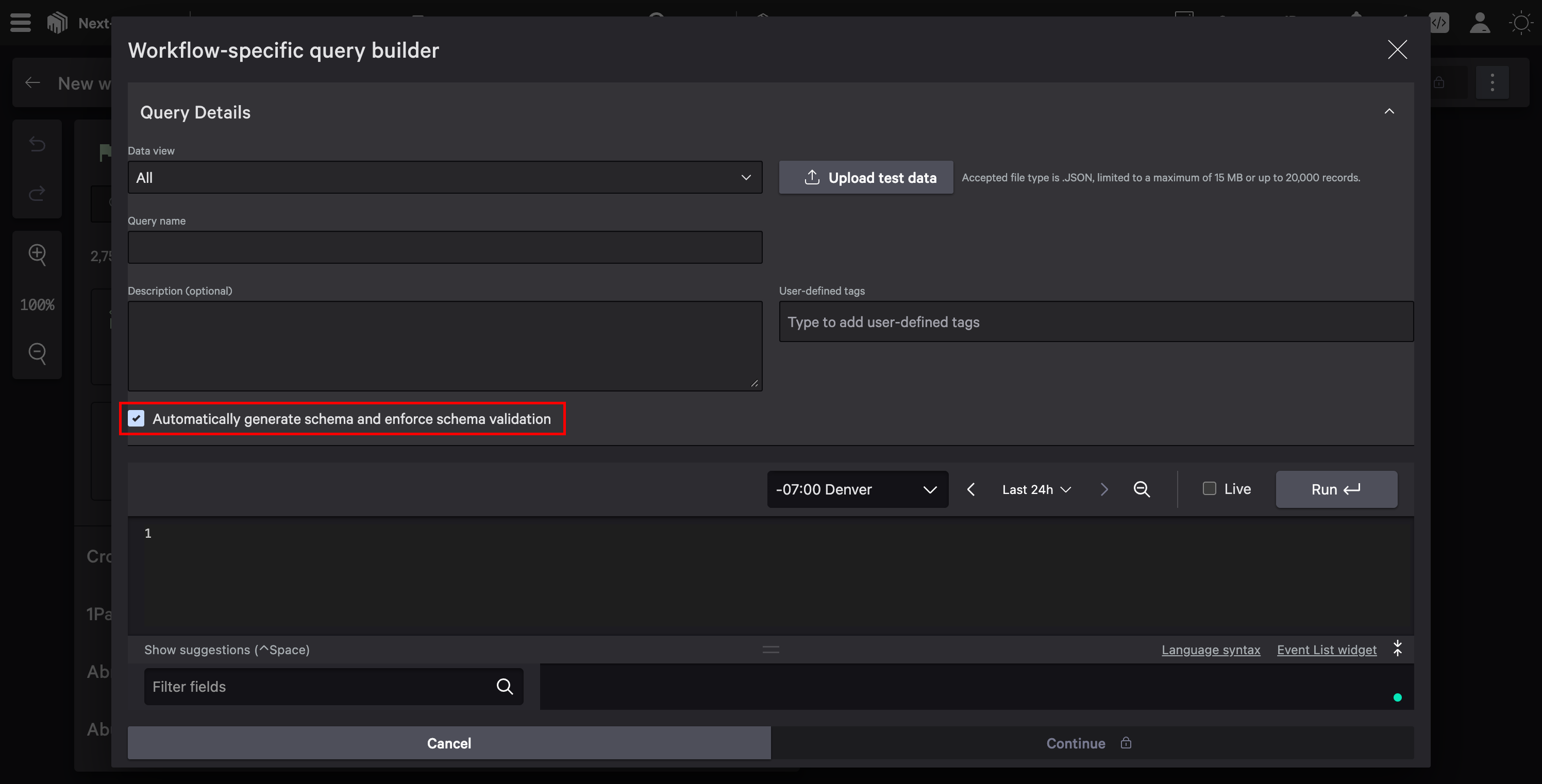
In the action configuration, look for the Automatically generate schema and enforce schema validation checkbox. By default, this is checked, which means Falcon Fusion SOAR will generate a schema based on your initial query results and validate all future responses against it.
When this checkbox is unchecked, we’ll refer to this as the “No Schema” configuration throughout this post, since no schema is generated or validated.
Uncheck this option to disable schema validation entirely. This tells Falcon Fusion SOAR to accept whatever structure the query returns without validating it against a predefined schema.
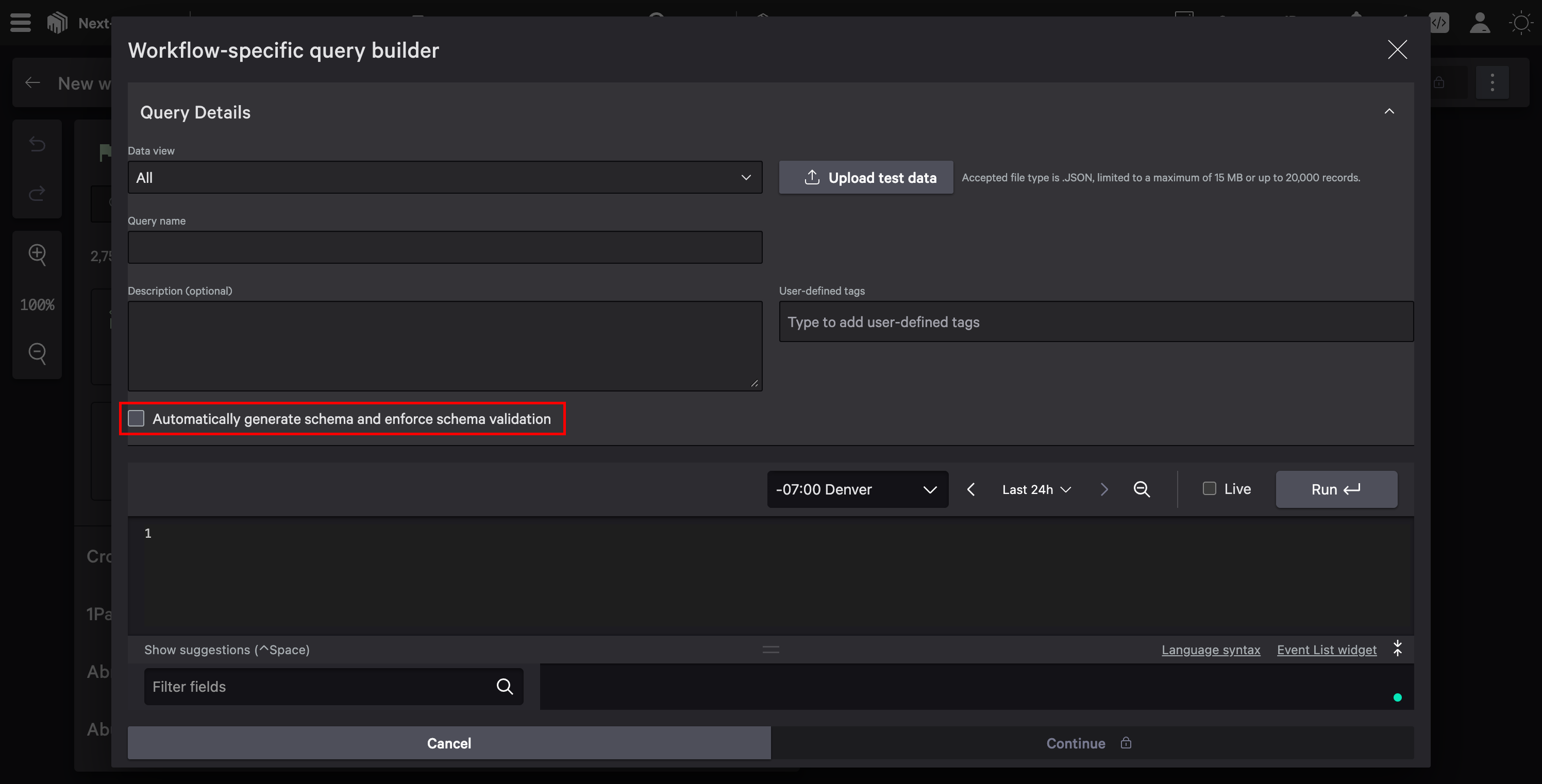
Save your action and the workflow. Your Event Query will now accept variable response structures without failing validation.
Working with Schemaless Data in Your Workflow
With schema validation disabled, you’re responsible for handling variable response structures in your workflow logic. Here are patterns that help.
Check for Field Existence
When referencing fields from a schemaless query, always check if the field exists before using it. In subsequent workflow actions, use conditional logic to handle missing fields gracefully. Falcon Fusion SOAR uses Common Expression Language (CEL) for data transformations, giving you powerful tools for working with dynamic data.
// Check if results exist and a field is present before using it
${size(data['eventQuery.results']) > 0 && data['eventQuery.results'][0].customField != null ? data['eventQuery.results'][0].customField : "N/A"}
This pattern first checks that results exist using the size() function, then verifies the field is not null before accessing it. If either condition fails, it returns “N/A” (or any default value you choose) when the field doesn’t exist, rather than failing the workflow.
Note that CEL expressions in Falcon Fusion SOAR reference workflow data using the data['actionName.fieldName'] syntax. The action name corresponds to how you named the Event Query action in your workflow, but with spaces removed. For example, if you name your action “Event Query”, the data path becomes data['EventQuery.results']. Without a schema, only the top-level results array is recognized. From there, standard CEL syntax handles the rest: [0] accesses array elements, .fieldName accesses properties. Use the Workflow data panel to copy the exact data path for any field.
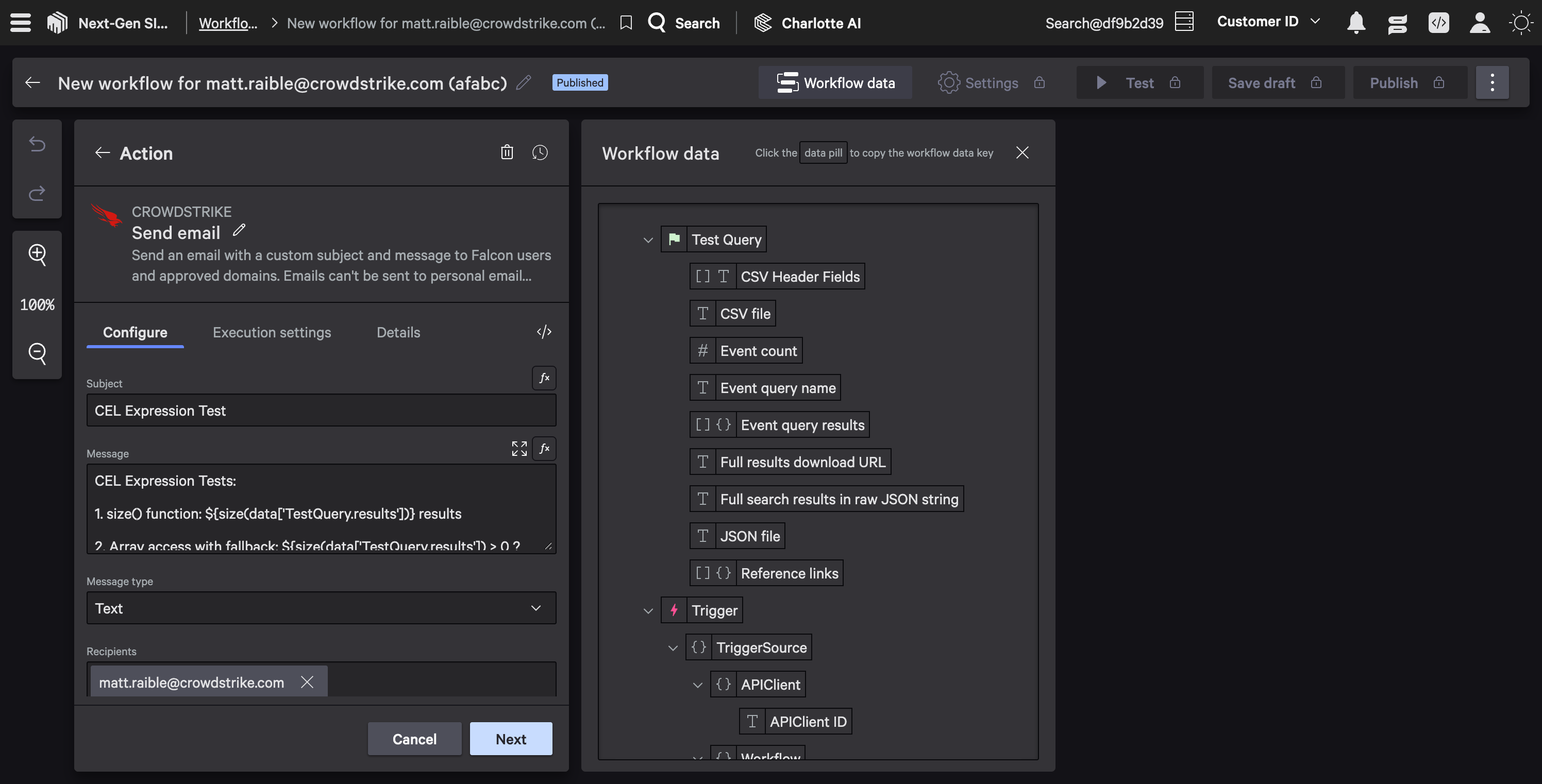
For more complex validation, CrowdStrike provides custom CEL extensions. You can validate JSON strings with cs.json.valid(), parse JSON with cs.json.decode(), or check IP addresses with cs.ip.valid(). These functions are particularly useful when working with schemaless data that might contain nested structures or require type validation.
Handle Array Variations
Dynamic queries might return different numbers of results. Don’t assume a specific array length.
// Safe iteration over variable-length results
${size(data['eventQuery.results']) > 0 ? data['eventQuery.results'][0].fieldName : "No results"}
Use Defensive Conditions
Add conditions before actions that depend on specific fields. If your workflow needs a field that might not exist, branch the logic to handle both cases. This prevents workflow failures when expected data isn’t available.
Test with Mock Data
During development, use the workflow test feature with mocked action data to understand what data structures you’re actually getting. This helps you build robust handling logic and verify your CEL expressions work correctly before publishing the workflow.
Use the Data Transformation Agent
If you have Charlotte AI, you don’t have to write CEL expressions by hand. The Data Transformation Agent lets you describe your logic in plain language and generates the CEL expression for you. It also explains how it arrived at the output, listing the evaluated data, applied conditions, and final result. Falcon Fusion SOAR is included at no extra cost; the Data Transformation Agent requires a Charlotte AI subscription.
Example: Enriching Falcon Next-Gen SIEM Detections
Let’s walk through a real-world scenario where schemaless queries solve a concrete problem.
The Challenge
You’re building a workflow that enriches Falcon Next-Gen SIEM detections with additional context. Your Event Query uses:
Ngsiem.detection.id = ?detectID
When you first configure this query, you test it with a specific detection. Falcon Fusion SOAR generates a schema based on that detection’s fields. Everything works.
Then the workflow runs against a different detection type. This detection includes fields that your first one didn’t have, and it’s missing some fields that were in your original schema. The workflow fails with a schema validation error.
The Solution
Enable the “No Schema” option for this Event Query. Now the query accepts whatever fields each detection includes.
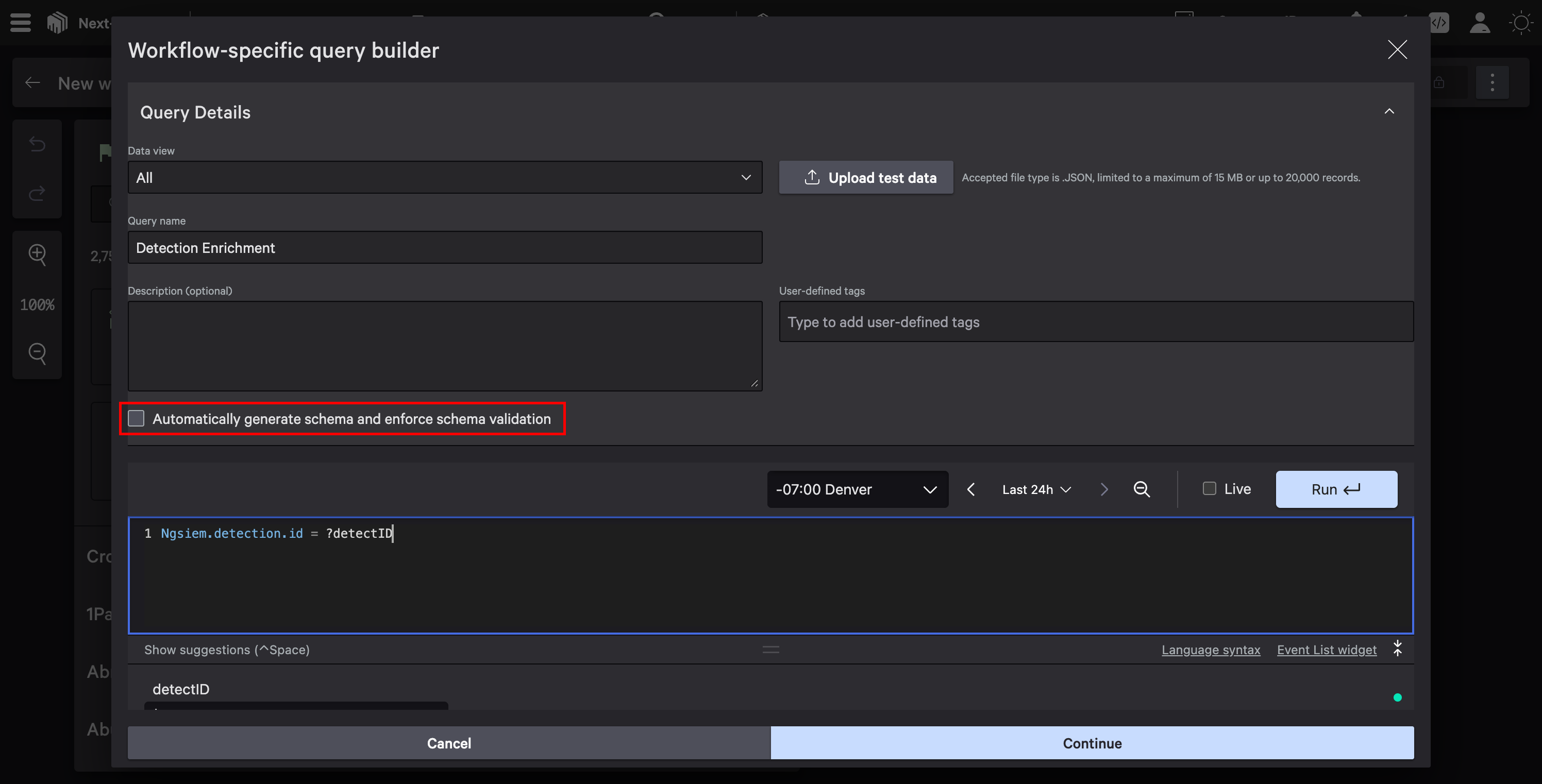
In the subsequent workflow steps, handle the variable data appropriately. Check for common fields that should always exist (like detection.id and detection.timestamp), handle optional fields with null checks and default values, and branch logic when different detection types require different processing.
Processing the Results
After the schemaless query, you might add a Charlotte AI action to summarize the detection data. Since Charlotte AI can handle variable input structures, it’s a natural fit for processing schemaless query results.
Analyze this Falcon Next-Gen SIEM detection and provide a security summary:

${data['eventQuery.raw_results']}

Include:
- Detection type and severity
- Key indicators present in the data
- Recommended investigation steps
Charlotte AI extracts the relevant information regardless of which specific fields are present.
Recommended Practices
A few practices help you use schemaless queries effectively.
Add error handling for missing fields. Use default values, conditional logic, or try-catch patterns to handle missing data gracefully. Don’t let a missing field crash your entire workflow. Always check array length with size() before accessing elements.
Consider hybrid approaches. Use a schemaless query to fetch the data, then normalize it in a subsequent step before passing it to typed downstream actions. This gives you flexibility at the source while maintaining type safety where it matters. For tips on customizing schemas when you do need them, see the documentation on customizing event query input and output.

// Normalize schemaless data into a consistent structure
// Use a Create Variable action with these CEL expressions:
{
  "detectionId": ${data['query.results'][0].detection.id},
  "severity": ${data['query.results'][0].severity != null ? data['query.results'][0].severity : "unknown"},
  "hostname": ${data['query.results'][0].device != null && data['query.results'][0].device.hostname != null ? data['query.results'][0].device.hostname : "N/A"},
  "description": ${data['query.results'][0].description != null ? data['query.results'][0].description : "No description available"}
}
This pattern extracts data from wherever it exists in the variable response and maps it to a consistent structure for downstream processing. Note that CEL doesn’t support the ?? null coalescing operator. Use ternary expressions (condition ? valueIfTrue : valueIfFalse) instead.
Test with diverse data. When developing workflows with schemaless queries, test against multiple data variations. Don’t just test the happy path where all fields exist.
Schema validation in Falcon Fusion SOAR provides valuable safety guarantees for predictable data. But when your queries return variable structures, the No Schema option gives you the flexibility to handle dynamic data without fighting schema validation errors.
Use schemaless queries when you’re working with exploratory queries during development, dynamic aggregations where response structure varies, detection enrichment queries with variable field structures, and any scenario where you can’t predict the exact response format upfront.
Remember that disabling schema validation shifts responsibility to your workflow logic. Handle missing fields gracefully, document field variations, and consider normalizing data before passing it to downstream actions.
For more details on Event Queries and workflow configuration, see the Falcon Fusion SOAR Event Query documentation. For a complete reference on data transformation functions, including all available CEL extensions, see the Data Transformation Functions documentation.
Learn More About Falcon Fusion SOAR
Ready to build more sophisticated Falcon Fusion SOAR workflows? These resources will help:
- Build Powerful API Integrations with Falcon Fusion SOAR HTTP Actions
- Dive into Falcon Foundry Functions with Python
- API Pagination Strategies for Falcon Foundry
Join the Fusion SOAR Developer Community to connect with other Falcon Fusion SOAR developers and share your experiences.
If you’d like to dive deeper into the core CrowdStrike Falcon components mentioned in this post, here are some resources:
- Falcon Next-Gen SIEM: Explore Falcon Next-Gen SIEM
- Falcon Foundry: Discover Falcon Foundry
- Falcon Fusion SOAR: Learn about Falcon Fusion SOAR
Have you run into schema validation challenges in your Falcon Fusion SOAR workflows? Found creative solutions for handling dynamic data? I’d love to hear about your experiences! Drop me a line on Twitter @mraible or connect with me on LinkedIn.