Publishing Certified Apps on Falcon Foundry
You’ve built a Falcon Foundry app that solves a real problem. Now you want to share it with the broader CrowdStrike community. Certified apps provide a structured workflow to publish your app globally through the app catalog, with full visibility into the review process through GitHub.
This post walks you through the complete journey: what certified apps are, how to set up your developer profile, the publication workflow, and what happens after approval. Whether you’re a partner looking to distribute your integration or a customer who wants to share a solution with other organizations, this guide covers everything you need to know.
Table of Contents:
- What Are Certified Apps?
- How Certified Apps Work
- Prerequisites
- Setting Up Your Developer Profile
- The Publication Workflow
- The Review and Approval Process
- After Approval: Access and Visibility
- Updating Your Certified App
- Get Started with Certified Apps
What Are Certified Apps?
Certified apps are Falcon Foundry applications that have been reviewed and approved by CrowdStrike for distribution through the app catalog. The certification process gives you control over publishing: you submit through a GitHub-based workflow, track review progress in real time, and manage updates on your own schedule.
The key benefits include a streamlined publishing workflow with visibility through GitHub, automatic updates for end users when you release new versions, cross-cloud availability (US-1, US-2, EU-1, Gov-1), and a “Certified” badge in the app catalog that signals your app has passed CrowdStrike’s review process.
Partners and customers with certified app creator access can publish apps. CrowdStrike’s ChromeOS app is an example of this workflow in action.
How Certified Apps Work
The certified apps system separates what you see as the app owner from what end users see when they install your app.
As the app owner, you retain full access to your app manager, source code, and all development artifacts. You control when to publish new releases and can test changes in your Falcon tenant before making them available globally.
End users see your app in the app catalog with a “Certified” badge. They install it like any other Falcon Foundry app and receive updates automatically when you publish new versions. End users don’t see your App Manager or development artifacts, only the published app and its functionality.
Certified apps support all Falcon Foundry artifact types except RTR scripts (functions, workflows, UI extensions, collections, Falcon LogScale repositories). Your app gets replicated across CrowdStrike clouds (US-1, US-2, EU-1, Gov-1), so customers in supported regions can install it.
Prerequisites
Before you can publish a certified app, you need four things in place.
- Certified app creator access. This isn’t enabled by default. Submit a support ticket through the CrowdStrike Support Portal to request certified app creator access for your organization. The Falcon Foundry team will enable the feature flag on your tenant.
- A GitHub account with a valid email address. The publication process uses GitHub for code review. You’ll authorize Falcon Foundry to create a private repository on your behalf where the review happens. Make sure your GitHub account has a verified email address.
- A working app that’s been deployed, released, and installed. You can only publish apps that are actually running in your Falcon tenant. This ensures you’ve tested the app yourself before making it available to others. If your app isn’t installed yet, deploy it, create a release, and install it from your app catalog first.
- Good documentation. Add thorough documentation for your app so customers understand its purpose and functionality. Installation steps and screenshots help users get started quickly. And make sure you don’t include any secrets or data files in your app, especially if you plan to make it open source.
Setting Up Your Developer Profile
Once you have certified app creator access, configure your developer profile before publishing. Navigate to Foundry > Developer profile in the Falcon console.
Enter your organization name. This appears in the app catalog alongside your certified apps, so use your official company or team name.
Authorize GitHub access. Click the authorization button to connect your GitHub account to Falcon Foundry. This grants Falcon Foundry permission to create repositories on your behalf for the review process. The repositories are private, visible only to you and CrowdStrike’s Falcon Foundry approvers. Even other CrowdStrike employees won’t have access to your repository.
Verify your email address. Falcon Foundry sends a verification email to confirm your identity. Check your inbox and click the verification link to complete setup.
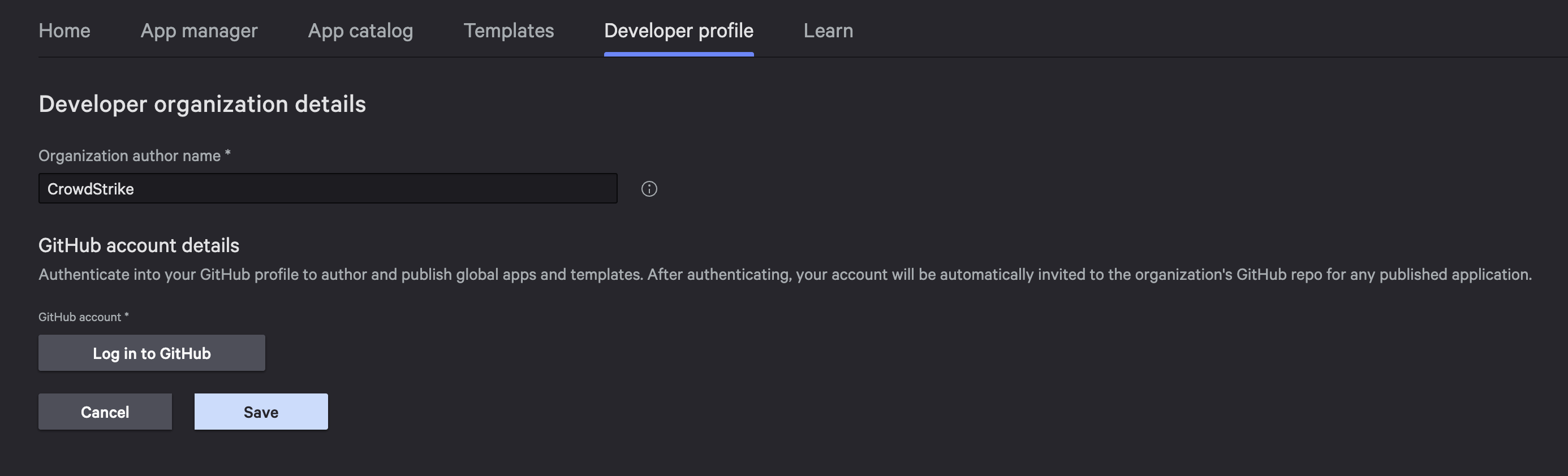
Once all three steps show as complete, you’re ready to publish.
The Publication Workflow
With your developer profile configured, publishing an app takes just a few clicks.
Important: Your app must be installed before you can publish it. This is a gating requirement. Falcon Foundry won’t let you publish an app that hasn’t been deployed and installed in your Falcon tenant first.
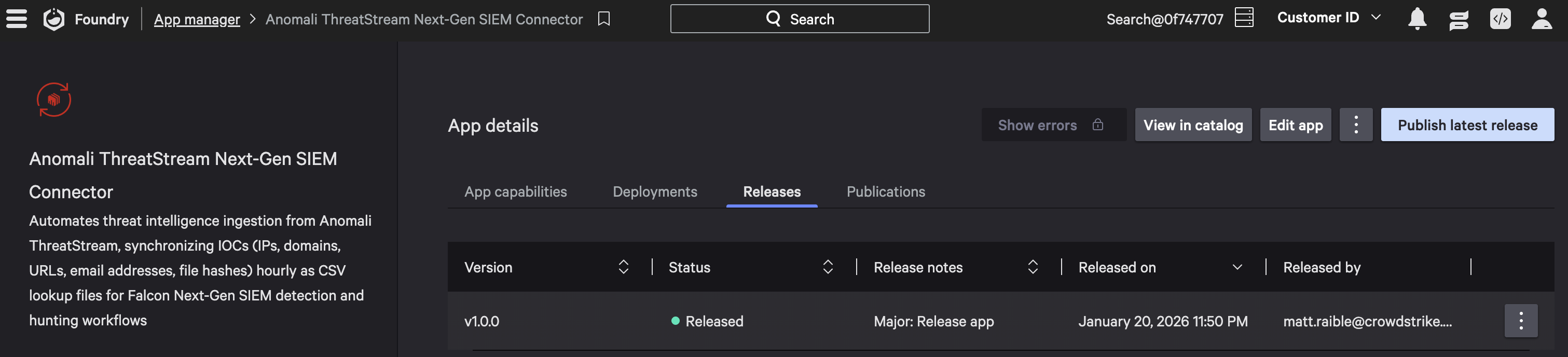
Navigate to Foundry > App manager, select your app, and click Publish latest release. You will see a dialog like the following:
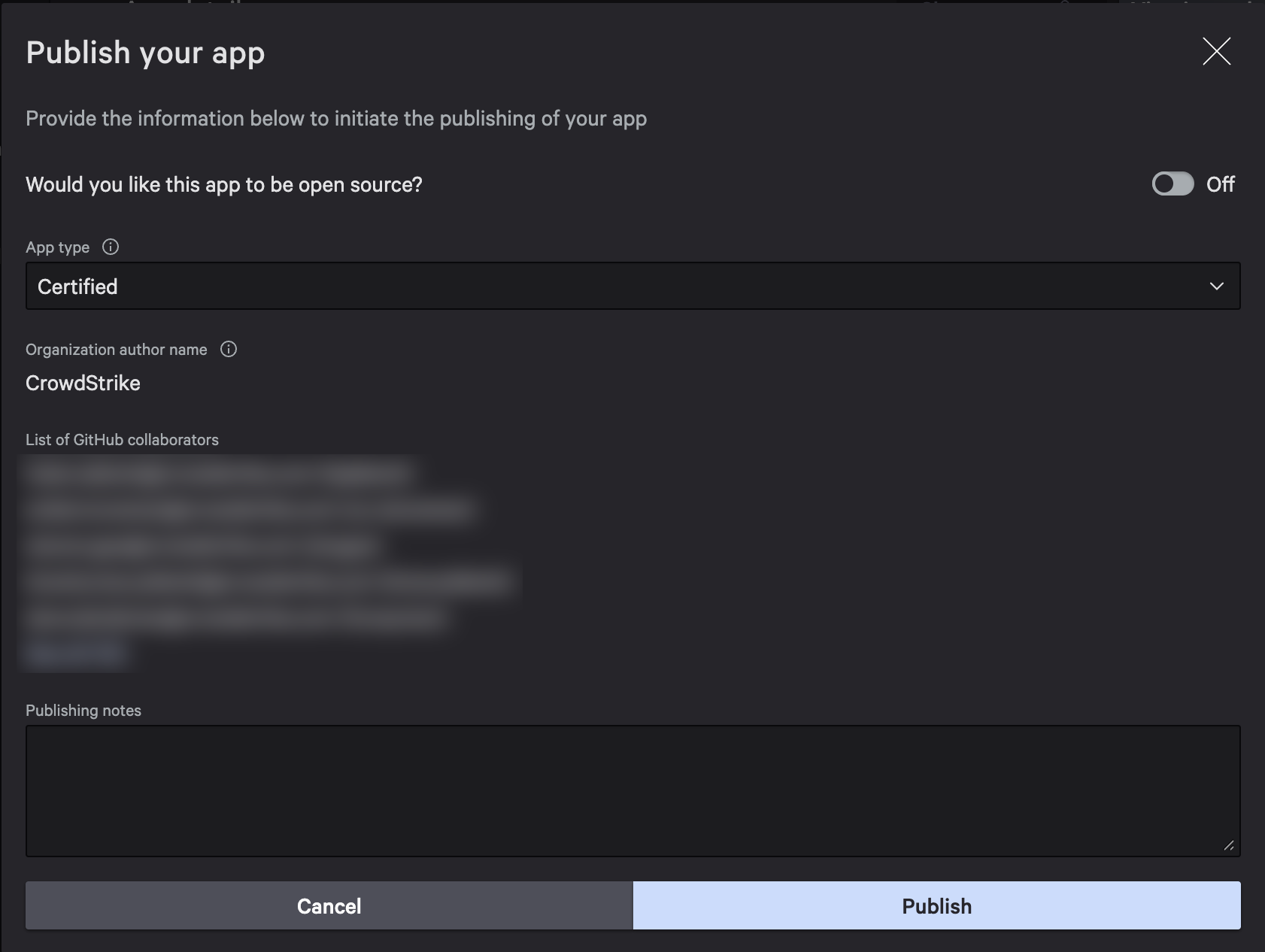
When you click Publish, Falcon Foundry packages your app and starts the publication process.
You’ll also see an option to make your app open source. If you toggle this on, the GitHub repository created for your app becomes publicly available. Customers still can’t access the app through the app manager, but they can view the source code on GitHub. This is entirely optional.
Behind the scenes, several things happen automatically. Falcon Foundry creates a private GitHub repository (if this is your first publication for this app) containing your app package. A pull request is generated with the app contents for CrowdStrike’s review. You can view this PR in GitHub to see exactly what’s being submitted.
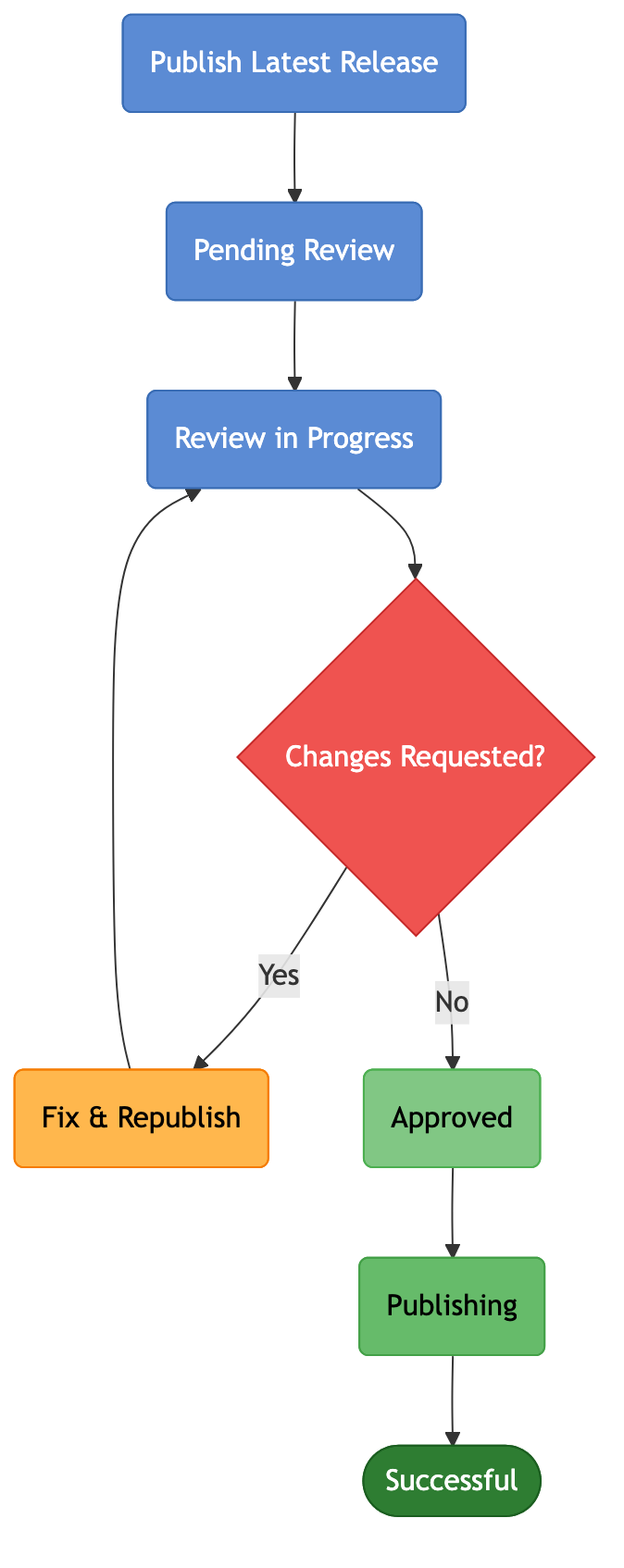
Your publication status transitions through several states:
- Pending Review: Your PR has been created and is waiting for a reviewer
- Review in Progress: A CrowdStrike reviewer is actively examining your app
The diagram below shows the complete publication flow, including the feedback loop if changes are requested.
Below is what the app manager looks like when you’re ready to publish. Notice the Publish latest release button.
The Review and Approval Process
CrowdStrike’s Falcon Foundry team reviews every certified app submission via the GitHub pull request. When you click Publish latest release, a repo and pull request will be created in the CrowdStrike-Foundry org. It will look similar to the following:
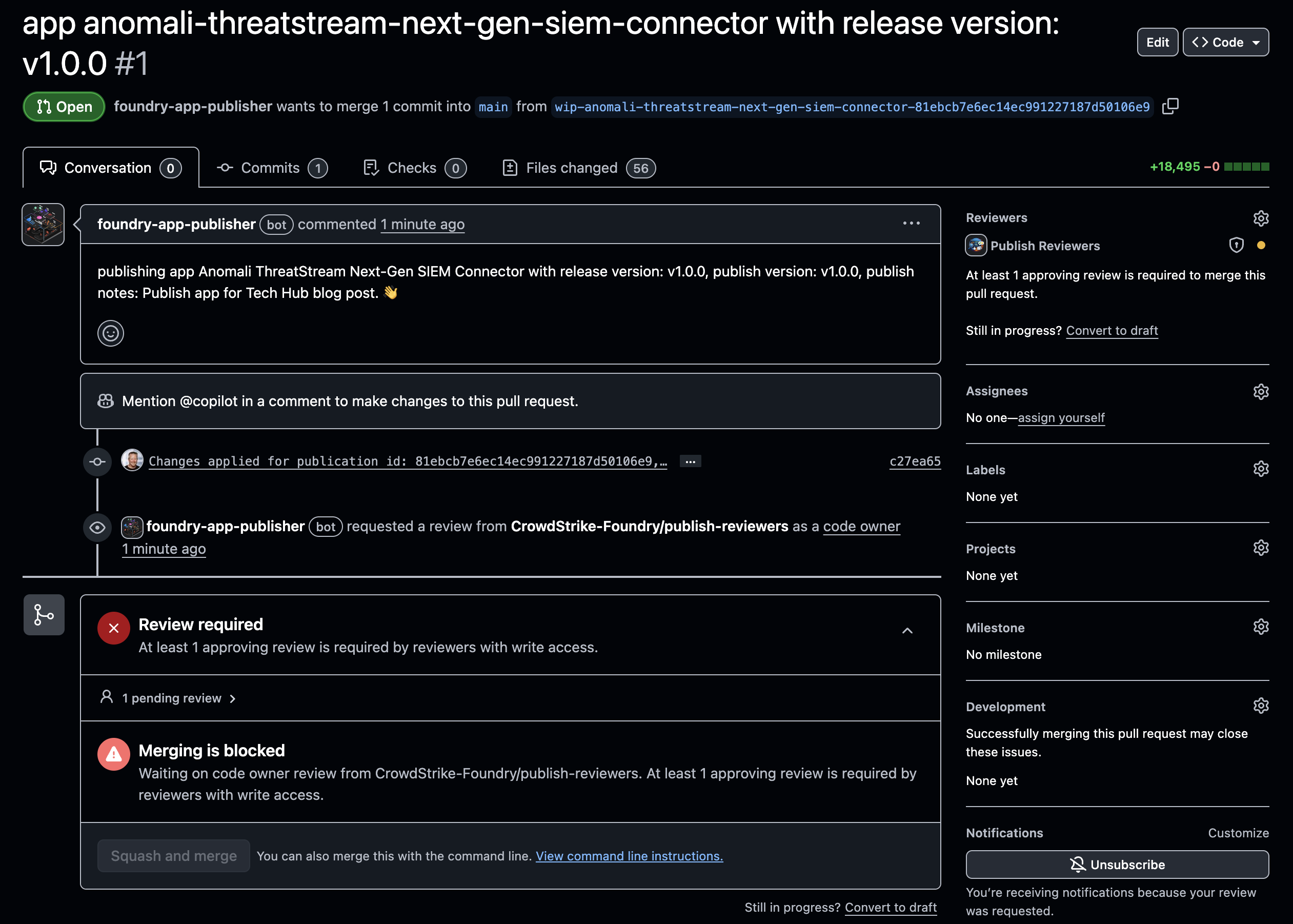
What reviewers look for: Security is the primary focus. Reviewers examine your code for vulnerabilities, verify that API permissions are appropriate, and check for anything that could pose a risk to customers who install your app. Functionality gets a high-level review, but CrowdStrike doesn’t deep-dive into your business logic since we’re not experts in what your specific app is meant to do.
If changes are requested: The review can be a multi-step process. If reviewers mark your PR with “request for changes,” you’ll need to make the fixes in your app, then go through the deploy/release/install/publish cycle again. Your changes will appear in the same PR for continued review.
After review, your status transitions through the remaining states:
- Approved: Your app passed review
- Publishing: Falcon Foundry is replicating your app across all clouds
- Successful: Your app is now available in the app catalog
When the PR is merged, your app goes global. The entire process happens through GitHub, so you can track progress by watching your repository.
After Approval: Access and Visibility
Once your app is approved and published, it appears in the app catalog with a “Certified” badge. This badge tells customers that your app has passed CrowdStrike’s review process.
Access is not automatic. By default, no customer CIDs have access to your newly certified app. The CrowdStrike team controls visibility. We can first enable it for a few test CIDs so you can verify the installation experience, then enable it for all customers.
You have two options for granting access:
- Individual CIDs: Grant access to specific customer IDs one at a time
- All CIDs: Make your app available to every CrowdStrike customer
Recommendation: Before rolling out broadly, test your certified app on a non-owner CID first. This lets you verify the installation experience and functionality from a customer’s perspective. For partners, work with your CrowdStrike account team to configure access for your target customers.
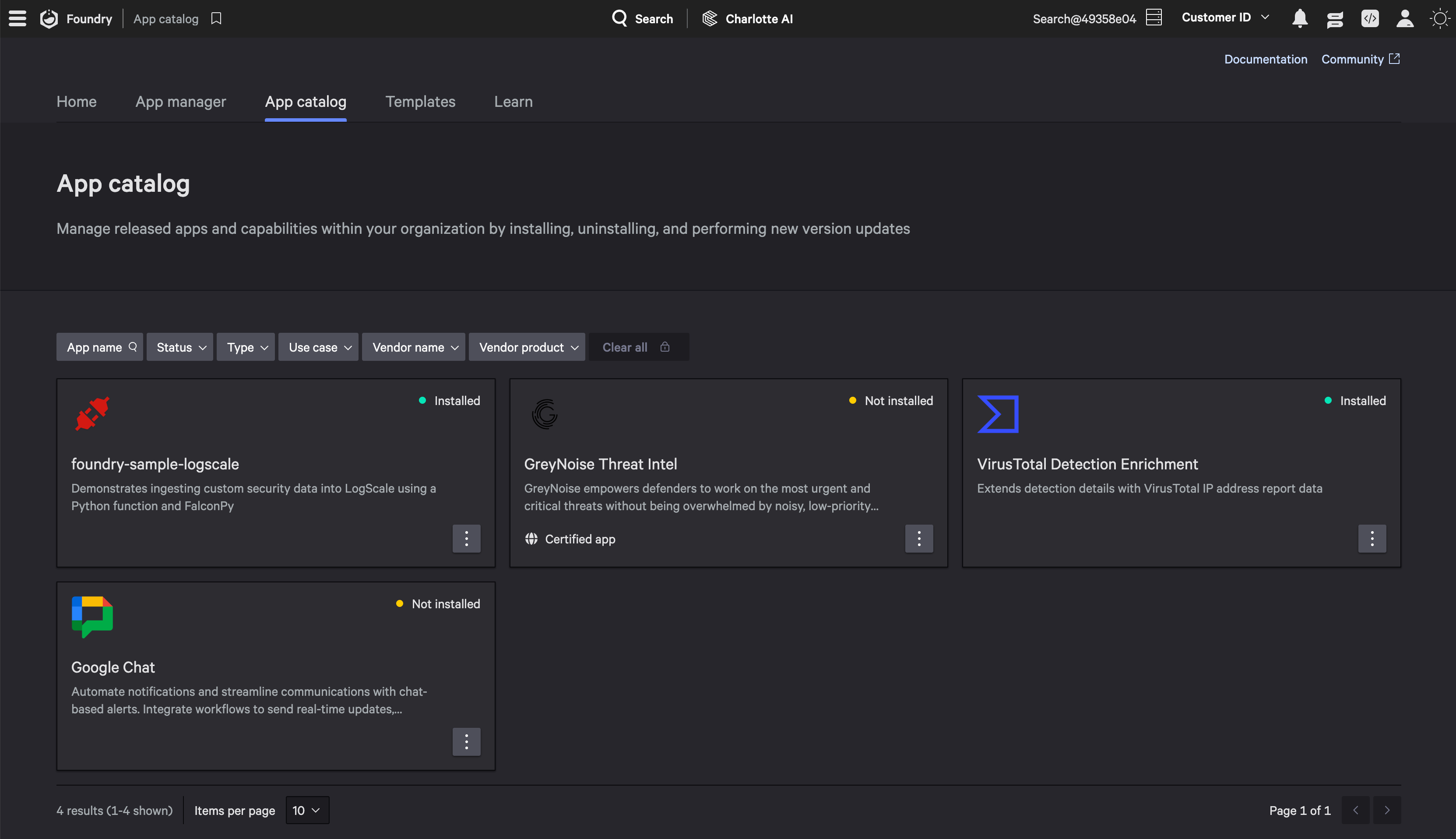
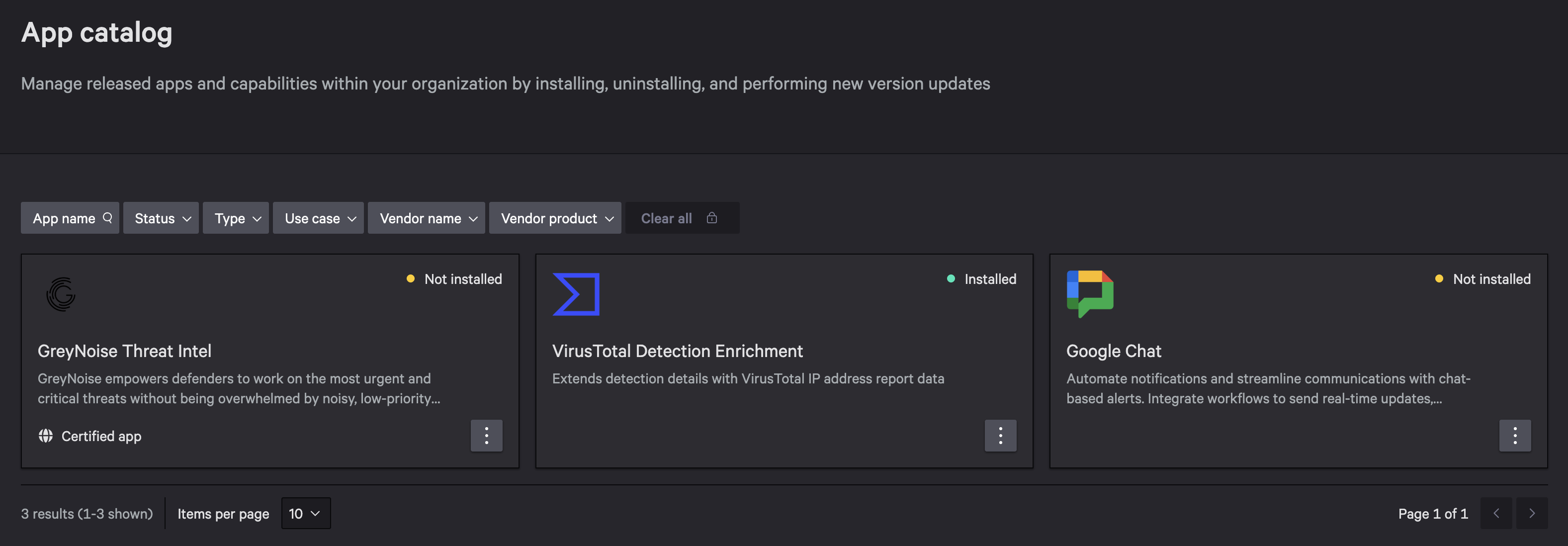
The screenshot below shows GreyNoise Threat Intel as a certified app that’s available for installation in Foundry > App catalog.
Updating Your Certified App
Certified apps aren’t static. When you improve your app, you’ll want those improvements available to customers.
Each new release requires a new publication. When you’re ready to publish an update, create a new release in your app manager, then click “Publish latest release” again. Falcon Foundry creates a new pull request in your existing GitHub repository.
The same review and approval cycle applies to updates. CrowdStrike reviews the changes, and once approved, the update rolls out. Once a published version is approved, it’s immutable. Any changes require a new version through the deploy/release/install/publish cycle.
Understanding version numbers: Your release versions (in app manager) are separate from publish versions (for global distribution). You might have released v1.5 in your development environment that becomes publish v2 when certified.
How updates reach users: Minor and patch version updates are applied automatically to all installed instances. Major version updates show an “Update Available” status, and users must explicitly accept the update to upgrade. This gives users control over when they make breaking changes.
Get Started with Certified Apps
Building a Certified App follows this journey:
- Build and test your Falcon Foundry app locally
- Deploy, release, and install it in your Falcon tenant
- Request certified app creator access via support ticket
- Configure your developer profile (GitHub authorization, email verification)
- Publish your app and wait for review
- Once approved, grant access to customers
- Publish updates as you improve the app
The benefits add up: the GitHub-based workflow gives you visibility into review progress and lets you respond to feedback directly. Automatic updates keep everyone on the latest version. The “Certified” badge builds trust with customers evaluating your app.
Ready to get started? Submit a support ticket through the CrowdStrike Support Portal to request certified app creator access. Once enabled, you’re just a few clicks away from making your Falcon Foundry app available to the entire CrowdStrike community.
Learn More About Falcon Foundry Development
If you’re still building your app, these guides walk you through the development process:
- A Practical Guide to Building a Falcon Foundry App for the First Time
- Create Custom Actions for SOAR with Falcon Foundry
- Dive into Falcon Foundry Functions with Python
- API Pagination Strategies for Falcon Foundry Functions and Workflows
Join the Foundry Developer Community to connect with other Falcon Foundry developers and share your experiences.
If you’d like to dive deeper into the core CrowdStrike Falcon components mentioned in this post, here are some resources:
- Falcon Next-Gen SIEM: Explore Falcon Next-Gen SIEM
- Falcon Foundry: Discover Falcon Foundry
We’d love to hear your feedback as you try out certified apps. Message me on LinkedIn or join the Foundry Developer Community.