


CrowdStrike Free Trial Guide
Get answers, start your free trial, and protect your business today.
15 day trial, no credit card required


Get started fast in four easy steps
1
2
3
4
Sign up
Activate
Install Sensors
Enable Modules
Step 1
Sign Up
Complete the trial form and request access to your free trial. Follow the login instructions found in your welcome email.
Step 2
Activate
By following the instructions found in your welcome email, you can activate your account and access the CrowdStrike Falcon® platform.
Step 3
Install Sensors
Once installed, the CrowdStrike Falcon® sensor provides protection for your systems. There’s no need to reinstall as long as your account is active.
Step 4
Enable Modules
Following setup, you’ll see Next-Gen Antivirus, Device Control, and Mobile available to use right away. Additional modules will require enablement.
What’s in your Falcon Trial
Included by default
Your trial includes three core Falcon platform modules.
- Falcon Prevent
- Falcon Device Control
- Falcon for Mobile
Available to try
Try additional modules to expand your evaluation. Explore identity security, cloud security, data protection, and more.

×
![]()
Need more time?
Extend your trial.
If your trial has ended and you need more time to help evaluate our solutions, our team is happy to help.
The CrowdStrike trial experience

15 day trial
15 days of free access to the award-winning Falcon platform.

Set up in just minutes
Get enterprise-grade protection in minutes. No reboots, no downtime, no disruption.

No infrastructure required
No infrastructure, no maintenance staff, no on-premises equipment. Just install and protect.
Ready to keep the Falcon platform?
Choose your plan.
Flexible pricing, your way — pay monthly or save with annual billing.
Need help? Contact us: (888) 512-8906
Security Essentials
Falcon
Go
$7.99
per device, billed monthly1
-
Protects against all types of threats, from malware and ransomware to sophisticated attacks, and deploys in minutes, immediately protecting your endpoints.
-
Provides the visibility and precise control required to enable safe usage of USB devices across your organization.
-
Safeguards your business from mobile threats with advanced protection that detects malicious activity and prevents unauthorized access on Android and iOS devices.
-
Firewall Management
-
Endpoint Detection and Response
-
Threat Intelligence & Hunting
-
Available to assist small and medium businesses with installation and operational concerns.
Enhanced Protection
Falcon
Pro
$14.99
per device, billed monthly
-
Protects against all types of threats, from malware and ransomware to sophisticated attacks, and deploys in minutes, immediately protecting your endpoints.
-
Provides the visibility and precise control required to enable safe usage of USB devices across your organization.
-
Safeguards your business from mobile threats with advanced protection that detects malicious activity and prevents unauthorized access on Android and iOS devices.
-
Delivers simple, centralized host firewall management, making it easy to manage and control host firewall policies.
-
Endpoint Detection and Response
-
Threat Intelligence & Hunting
-
Available to assist small and medium businesses with installation and operational concerns.
Advanced Protection
Falcon
Enterprise
$19.99
per device, billed monthly
-
Protects against all types of threats, from malware and ransomware to sophisticated attacks, and deploys in minutes, immediately protecting your endpoints.
-
Provides the visibility and precise control required to enable safe usage of USB devices across your organization.
-
Safeguards your business from mobile threats with advanced protection that detects malicious activity and prevents unauthorized access on Android and iOS devices.
-
Delivers simple, centralized host firewall management, making it easy to manage and control host firewall policies.
-
Delivers continuous, comprehensive endpoint visibility and automatically detects and intelligently prioritizes malicious activity to ensure nothing is missed and potential breaches are stopped.
-
Partners you with a team of elite cybersecurity experts to hunt continuously within the Falcon platform for faint signs of sophisticated intrusions, leaving attackers nowhere to hide.
-
Available to assist small and medium businesses with installation and operational concerns.
Security Essentials
Falcon
Go
$59.99
per device, billed annually1
-
Protects against all types of threats, from malware and ransomware to sophisticated attacks, and deploys in minutes, immediately protecting your endpoints.
-
Provides the visibility and precise control required to enable safe usage of USB devices across your organization.
-
Safeguards your business from mobile threats with advanced protection that detects malicious activity and prevents unauthorized access on Android and iOS devices.
-
Firewall Management
-
Endpoint Detection and Response
-
Threat Intelligence & Hunting
-
Available to assist small and medium businesses with installation and operational concerns.
Enhanced Protection
Falcon
Pro
$99.99
per device, billed annually
-
Protects against all types of threats, from malware and ransomware to sophisticated attacks, and deploys in minutes, immediately protecting your endpoints.
-
Provides the visibility and precise control required to enable safe usage of USB devices across your organization.
-
Safeguards your business from mobile threats with advanced protection that detects malicious activity and prevents unauthorized access on Android and iOS devices.
-
Delivers simple, centralized host firewall management, making it easy to manage and control host firewall policies.
-
Endpoint Detection and Response
-
Threat Intelligence & Hunting
-
Available to assist small and medium businesses with installation and operational concerns.
Advanced Protection
Falcon
Enterprise
$184.99
per device, billed annually
-
Protects against all types of threats, from malware and ransomware to sophisticated attacks, and deploys in minutes, immediately protecting your endpoints.
-
Provides the visibility and precise control required to enable safe usage of USB devices across your organization.
-
Safeguards your business from mobile threats with advanced protection that detects malicious activity and prevents unauthorized access on Android and iOS devices.
-
Delivers simple, centralized host firewall management, making it easy to manage and control host firewall policies.
-
Delivers continuous, comprehensive endpoint visibility and automatically detects and intelligently prioritizes malicious activity to ensure nothing is missed and potential breaches are stopped.
-
Partners you with a team of elite cybersecurity experts to hunt continuously within the Falcon platform for faint signs of sophisticated intrusions, leaving attackers nowhere to hide.
-
Available to assist small and medium businesses with installation and operational concerns.
FAQs
Please see the list of supporting operating systems in the deployment section here.
The Falcon platform is optimized for Google Chrome.
The Falcon platform is a 100% cloud-based solution, offering security as a service (SaaS) to customers. Once you’ve deployed the sensor onto the endpoint, your endpoint is protected online and offline — 24/7.
Any existing solutions should be uninstalled before you begin your trial. The CrowdStrike Falcon trial is pre-configured to the highest security setting for your protection and will work optimally if it is the only AV solution on your endpoints. If you need assistance, contact the Trial Team at falcontrial@crowdstrike.com.
The CrowdStrike Falcon® sensor is lightweight and only needs to be deployed once. Updates are automatic and the sensor works online and offline.
1. Prepare for installation: For optimal performance, uninstall or disable other antivirus solutions before installing the Falcon sensor.
2. Activate your account via an email you should’ve received.
3. Log in and install sensors to your devices by following the instructions on the mainview once you log in. It includes video guides on how to install for your particular OS. You can also find instructions here.
2. Activate your account via an email you should’ve received.
3. Log in and install sensors to your devices by following the instructions on the mainview once you log in. It includes video guides on how to install for your particular OS. You can also find instructions here.
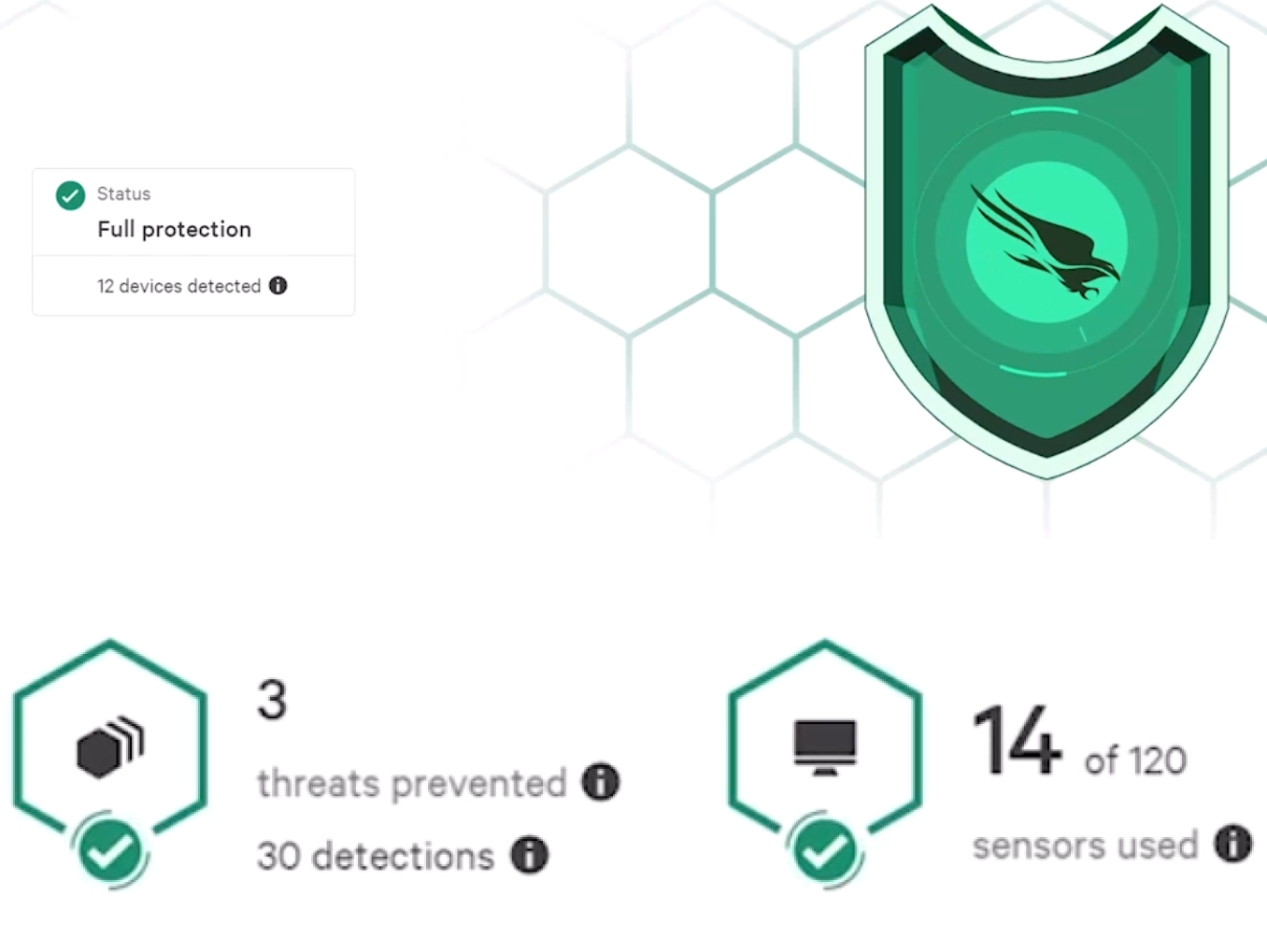
You’ve successfully installed the sensor when you log into the platform and see the shield on the mainview lit up green. You will also see the number of devices with successfully installed sensors and if there are any detections.
Once you are logged into the platform in the top right hand corner you should see a button to manage users, click on that button. On the next page you’ll see another button to invite and add new users, and you’ll be able to manage their permissions and access from this page as the admin.
There are three Falcon platform modules automatically included in the trial: Falcon Prevent, Falcon Device Control, and Falcon for Mobile. There are ten additional modules you can enable to customize your trial experience:
- CrowdStrike Falcon® Identity Threat Protection
- CrowdStrike Falcon® Discover
- CrowdStrike Falcon® Data Protection
- CrowdStrike Falcon® File Vantage
- CrowdStrike Falcon® Firewall Management
- CrowdStrike Falcon® for IT Trial
- CrowdStrike Falcon® Forensics
- CrowdStrike Falcon® Insight XDR
- CrowdStrike Falcon® Sandbox
- CrowdStrike Falcon® Cloud Security with Containers
To test individual modules, open the console menu, select CrowdStrike Store → CrowdStrike Apps → Select your desired module → Try it for free. Note that some modules require another module to function properly. You can see dependencies for each module on the page under Falcon Requirements. It may take up to 30 minutes for all modules to become fully functional.
Yes. The Falcon Prevent module is a fully certified AV replacement solution and allows organizations to confidently replace their existing legacy AV.
Falcon Prevent incorporates identification and prevention of known malware, machine learning for unknown malware, exploit blocking and advanced Indicator of Attack (IOA) behavioral techniques to protect against attacks whether your endpoints are online or offline. Falcon Prevent also features integration with Windows System Center, for organizations that need to prove compliance with appropriate regulatory requirements.
Falcon Prevent incorporates identification and prevention of known malware, machine learning for unknown malware, exploit blocking and advanced Indicator of Attack (IOA) behavioral techniques to protect against attacks whether your endpoints are online or offline. Falcon Prevent also features integration with Windows System Center, for organizations that need to prove compliance with appropriate regulatory requirements.
Yes. The Falcon platform can help organizations in their efforts to meet numerous compliance and certification requirements. Our platform has received third-party validation for the following regulations: PCI DSS v4.0 | HIPAA | NIST | FFIEC | PCI Forensics | NSA-CIRA | SOC 2 | CSA-STAR | AMTSO | AV-Comparatives.
Yes. As long as the lightweight sensor has been installed, it will use prevention technologies to protect your endpoints whether they are online or offline. The technologies include machine learning to protect against known and zero-day malware, exploit blocking, hash blocking and CrowdStrike’s behavioral artificial intelligence heuristic algorithms, known as indicators of attack (IOAs).
Falcon Prevent uses an array of complementary prevention and detection methods to protect against ransomware:
- Blocking of known ransomware
- Exploit blocking to stop the execution and spread of ransomware via unpatched vulnerabilities
- Machine learning for detection of previously unknown “zero-day” ransomware
- Indicators of attack (IOAs) through behavioral analysis to identify and block additional unknown ransomware, as well as new categories of ransomware that do not use files to encrypt victims’ data
Yes, Falcon Prevent offers powerful and comprehensive prevention capabilities. Falcon Prevent can stop execution of malicious code, block zero-day exploits, kill processes and contain command-and-control callbacks.
No. The Falcon platform delivers next-generation endpoint protection via the cloud — a key element of “next-gen” is reducing overhead, friction and cost in protecting your environment. There is no on-premises equipment to be maintained, managed or updated. The Falcon sensor is unobtrusive in terms of endpoint system resources and updates are seamless, requiring no reboots. Our web-based management console provides an intuitive and informative view of your complete environment.
A red banner at the top of the platform will indicate the number of days left in your free trial. At the end of this period, access to the CrowdStrike Falcon UI will be terminated. However, if you’d like to extend your time or have additional questions, you can contact the Trial Team at falcontrial@crowdstrike.com.
- Log in to your CrowdStrike account
- Select Host management and setup → Sensor downloads → Tool Downloads
- Download the installation tool that corresponds with your OS
- You will need your “maintenance token” to validate the approval to uninstall
- Navigate to Host setup and management and select the Host that you want to remove. A sidebar will open. Click on Reveal maintenance token to obtain the single-use maintenance token needed to uninstall the sensor.
1Purchases of Falcon Go are limited to a maximum of 100 devices.
